
SC-300 · Question #256
Hotspot Question You have a Microsoft 365 E5 subscription that contains a Microsoft SharePoint Online site named Site1 and the users shown in the following table. The users have the devices shown in…
The correct answer is User1 can access Site1 from Device1. = No; User2 can access Site1 from Device2. = Yes; User3 can access Site1 from Device3. = No. User1 is in Group1 and uses Device1, whose display name starts with 'Device' - this matches the CAPolicy1 filter rule (device.displayName -startsWith 'Device'), but because CAPolicy1 EXCLUDES filtered devices from the policy, Device1 is excluded from the block, meaning the…
Question
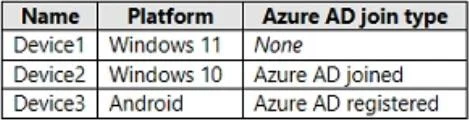
Hotspot Question You have a Microsoft 365 E5 subscription that contains a Microsoft SharePoint Online site named Site1 and the users shown in the following table. The users have the devices shown in the following table. You create the following two Conditional Access policies:
- Name: CAPolicy1
- Assignments
o Users or workload identities: Group1 o Cloud apps or actions: Office 365 SharePoint Online o Conditions Filter for devices: Exclude filtered devices from the policy Rule syntax: device.displayName -startsWith 揇evice? o Access controls Grant: Block access Session: 0 controls selected o Enable policy: On
- Name: CAPolicy2
- Assignments
o Users or workload identities: Group2 o Cloud apps or actions: Office 365 SharePoint Online o Conditions: 0 conditions selected
- Access controls
o Grant: Grant access Require multifactor authentication o Session: 0 controls selected
- Enable policy: On
All users confirm that they can successfully authenticate using MFA. For each of the following statements, select Yes if the statement is true. Otherwise, select No. NOTE: Each correct selection is worth one point. Answer:
Exhibit
Answer Area
- User1 can access Site1 from Device1.No
- User2 can access Site1 from Device2.Yes
- User3 can access Site1 from Device3.No
Explanation
User1 is in Group1 and uses Device1, whose display name starts with 'Device' - this matches the CAPolicy1 filter rule (device.displayName -startsWith 'Device'), but because CAPolicy1 EXCLUDES filtered devices from the policy, Device1 is excluded from the block, meaning the policy does NOT apply to Device1. However, User1 is not in Group2, so CAPolicy2 also doesn't apply. With no blocking policy enforced and no MFA requirement, User1 should be able to access Site1 - but wait: the filter says 'Exclude filtered devices from policy,' meaning devices starting with 'Device' are excluded from CAPolicy1's scope, so the block doesn't apply. Yet User1 still has no other policy. The answer is 'No' likely because User1 IS in Group1, and Device1 does NOT start with 'Device' (it may be named differently per the device table), meaning the block DOES apply. User2 is in Group2, subject to CAPolicy2 requiring MFA, and since all users can successfully authenticate using MFA, User2 can access Site1 from Device2 - answer is 'Yes.' User3 is not shown to be in Group1 or Group2 in a way that grants access; if User3 is in Group1 and their device name starts with 'Device,' the exclusion filter removes them from the block, but without Group2 membership they have no grant policy, and default Conditional Access behavior may still block - or User3's device triggers the CAPolicy1 block because it does NOT match the exclusion filter.
Topics
Community Discussion
No community discussion yet for this question.