
SC-300 · Question #195
You have an Azure Active Directory (Azure AD) tenant that contains the users shown in the following table. You add an enterprise application named App1 to Azure AD and set User1 as the owner of…
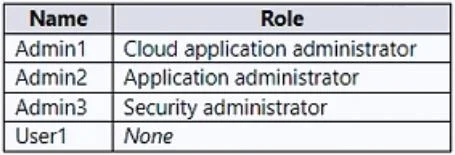
The correct answer is D. Admin1 and Admin2 only. To approve requests, a reviewer must be a global administrator, cloud application administrator, or application administrator. The reviewer must already have one of these admin roles assigned; simply designating them as a reviewer doesn't elevate their privileges…
Question
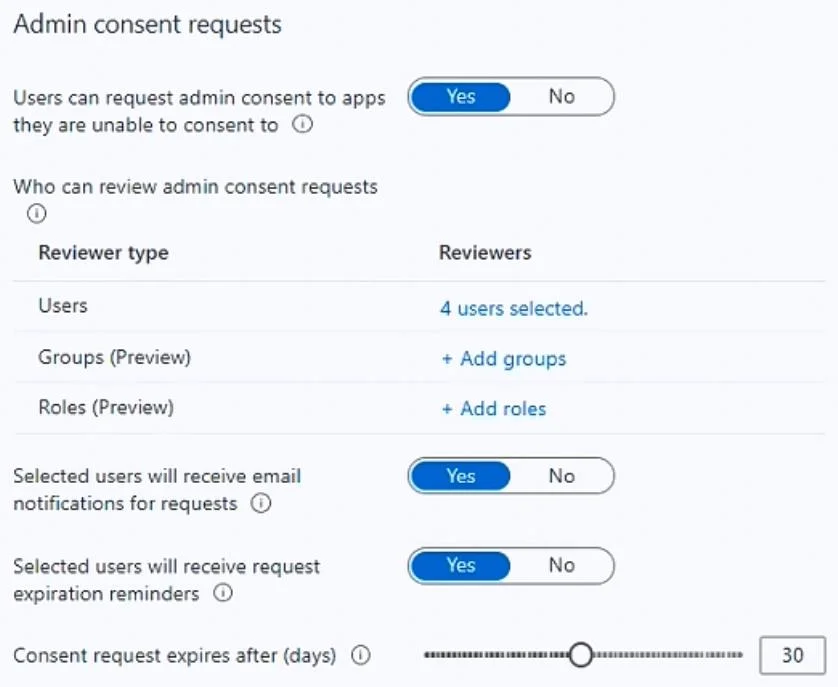
You have an Azure Active Directory (Azure AD) tenant that contains the users shown in the following table. You add an enterprise application named App1 to Azure AD and set User1 as the owner of App1. App1 requires admin consent to access Azure AD before the app can be used. You configure the Admin consent requests settings as shown in the following exhibit. Admin1, Admin2, Admin3, and User’ are added as reviewers. Which users can review and approve the admin consent requests?
Exhibits
Options
- AAdmin1 only
- BAdmin1, Admin2 and Admin3 only
- CAdmin1, Admin2, and User1 only
- DAdmin1 and Admin2 only
- EAdmin1, Admin2, Admin3, and User1
How the community answered
(66 responses)- A11% (7)
- B6% (4)
- D80% (53)
- E3% (2)
Explanation
To approve requests, a reviewer must be a global administrator, cloud application administrator, or application administrator. The reviewer must already have one of these admin roles assigned; simply designating them as a reviewer doesn't elevate their privileges. https://learn.microsoft.com/en-us/azure/active-directory/manage-apps/configure-admin-consent-
Topics
Community Discussion
No community discussion yet for this question.