
SC-300 · Question #166
Hotspot Question Your network contains an on-premises Active Directory domain that syncs to an Azure Active Directory (Azure AD) tenant. The tenant contains the groups shown in the following table…
The correct answer is User1 is Directory-synced = No; User2 is Directory-synced = No; User3 is Directory-synced = Yes. The correct approach involves analyzing the access review's scope and target groups, understanding user group memberships, and recognizing the limitations of Azure AD access reviews on directory-synced groups.
Question
Exhibits


Answer Area
- User1 is Directory-syncedNo
- User2 is Directory-syncedNo
- User3 is Directory-syncedYes
Explanation
The correct approach involves analyzing the access review's scope and target groups, understanding user group memberships, and recognizing the limitations of Azure AD access reviews on directory-synced groups.
Approach. To answer correctly, each statement must be evaluated against the access review's configuration, user memberships, group types, and the capabilities of Azure AD access reviews.
-
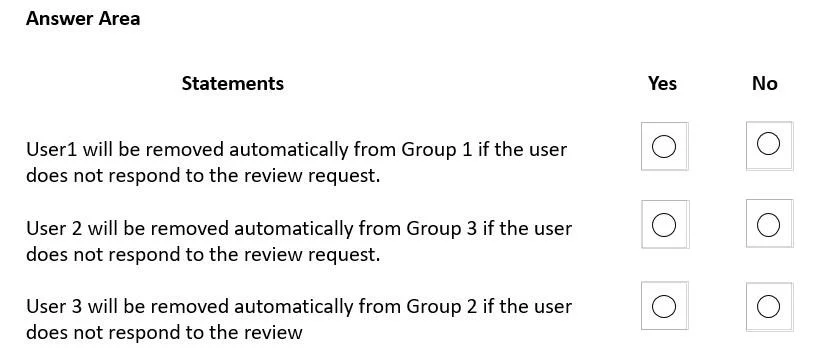
Statement 1: User1 will be removed automatically from Group 1 if the user does not respond to the review request.
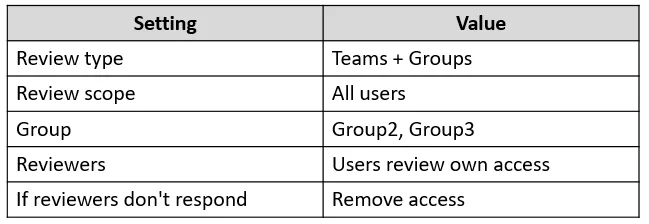
- Analysis: User1 is a member of Group1. The access review is configured to target Group2 and Group3 (as per 'Group' setting). Group1 is not part of the access review scope. Therefore, User1's membership in Group1 is not subject to this particular access review.
- Correct interaction: Select 'No'.
-
Statement 2: User 2 will be removed automatically from Group 3 if the user does not respond to the review request.
- Analysis: User2 is a member of Group2. The access review is configured for Group2 and Group3. If User2 were to be removed due to non-response, it would be from Group2, not Group3. User2 is not a member of Group3. Therefore, User2 cannot be removed from Group3 by this review.
- Correct interaction: Select 'No'.
-
Statement 3: User 3 will be removed automatically from Group 2 if the user does not respond to the review.
- Analysis: User3 is a member of Group3. The access review is configured for Group2 and Group3. If User3 were subject to removal, it would be from Group3, not Group2. User3 is not a member of Group2. Furthermore, Group2's source is 'Active Directory domain', meaning it is directory-synced from on-premises AD. Azure AD access reviews cannot modify the membership of groups that are synced from on-premises Active Directory. Membership for such groups must be managed in the on-premises AD itself.
- Correct interaction: Select 'No'.
All statements are false, so the correct interaction is to select 'No' for all three statements.
Common mistakes.
- common_mistake. Common mistakes stem from misinterpreting the access review's scope or not understanding the limitations of Azure AD's ability to manage synced objects:
- Assuming a broader review scope: Selecting 'Yes' for Statement 1 implies Group1 is included in the review, which it is not. The 'Group' setting explicitly lists Group2 and Group3 as targets.
- Confusing user membership with review target: Selecting 'Yes' for Statement 2 or 3 suggests that a user will be removed from a group they are not even a member of, or from a group that is not the direct target of their specific review.
- Ignoring 'Directory-synced' limitations: A significant mistake for Statement 3 would be to assume Azure AD can remove members from Group2. Group2 is 'Active Directory domain' sourced, meaning its membership is mastered on-premises. Azure AD access reviews can only report on these but cannot enforce membership changes directly. This applies even if User3 was a member of Group2 and Group2 was in scope; the 'Remove access' action would not be effective for a synced group. Similarly, if User3 was in Group2, and Group2 was a synced group, the removal action would fail even if User3 was synced from on-prem AD.
Concept tested. The core concepts tested are Azure AD Identity Governance, specifically Access Reviews, and the interplay between cloud-managed and directory-synced objects (users and groups). This includes understanding:
- Access Review Scope: How to define and interpret which groups and users are targeted by an access review.
- Reviewer Actions: The outcome of 'If reviewers don't respond' settings, such as 'Remove access'.
- Group and User Source: The critical distinction between cloud-native objects and objects synced from on-premises Active Directory. Azure AD access reviews have limitations in enforcing changes (like membership removal) on groups whose source is the 'Active Directory domain' (i.e., synced groups), as their authoritative membership is managed on-premises. Azure AD can only report on such groups but not directly modify them.
Topics
Community Discussion
No community discussion yet for this question.