
SC-300 · Question #126
Hotspot Question You have a Microsoft 36S tenant. You create a named location named HighRiskCountries that contains a list of high-risk countries. You need to limit the amount of time a user can…
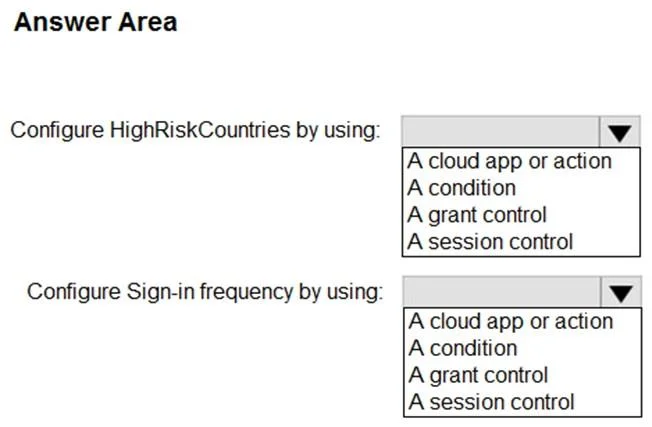
The correct answer is Configure HighRiskCountries by using:: A condition; Configure Sign-in frequency by using:: A session control. This question tests knowledge of Conditional Access policy configuration in Microsoft Entra ID (Azure AD) to restrict session lifetime for users connecting from high-risk geographic locations.
Question
Exhibit
Answer Area
- Configure HighRiskCountries by using:A conditionA cloud app or actionA conditionA grant controlA session control
- Configure Sign-in frequency by using:A session controlA cloud app or actionA conditionA grant controlA session control
Explanation
This question tests knowledge of Conditional Access policy configuration in Microsoft Entra ID (Azure AD) to restrict session lifetime for users connecting from high-risk geographic locations.
Approach. To limit authentication time from high-risk countries, you configure two key areas: (1) Under 'Assignments > Conditions > Locations', select 'Include > Selected locations' and choose the 'HighRiskCountries' named location to scope the policy to those countries. (2) Under 'Session controls', configure 'Sign-in frequency' with a short time interval (e.g., 1 hour) to force re-authentication after that period. This ensures users connecting from high-risk countries must re-authenticate more frequently, reducing the window of exposure if a session is compromised. Optionally, 'Persistent browser session' can be set to 'Never persistent' to prevent browser sessions from remaining signed in.
Concept tested. Conditional Access policy configuration in Microsoft Entra ID - specifically using Named Locations as a condition and Session controls (Sign-in frequency) to enforce re-authentication limits based on geographic risk.
Topics
Community Discussion
No community discussion yet for this question.