
SC-100 · Question #267
Drag and Drop Question You have an Azure subscription that contains a resources group named RG1. RG1 contains multiple Azure Files shares. You need to recommend a solution to deploy a backup…
The correct answer is Create a Recovery Services vault.; Enable vault immutability.; Lock immutability for the vault. To secure Azure Files share backups against deletion, privilege escalation, and retention policy changes, first create a Recovery Services vault, then enable vault immutability, and finally lock the vault immutability.
Question
Exhibits
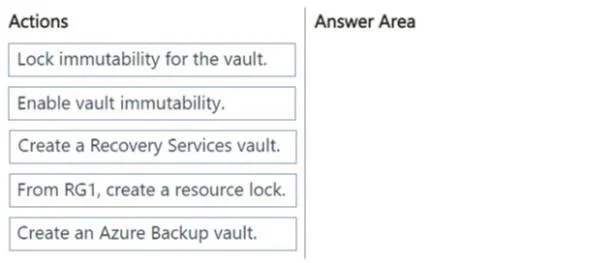
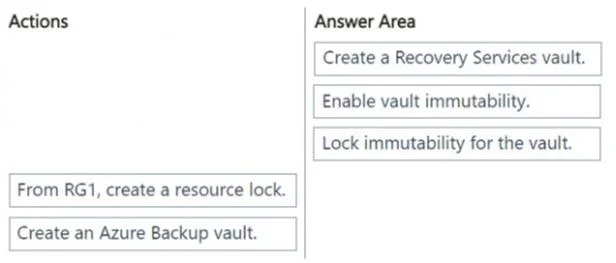
Answer Area
Drag items
Correct arrangement
- Create a Recovery Services vault.
- Enable vault immutability.
- Lock immutability for the vault.
Explanation
To secure Azure Files share backups against deletion, privilege escalation, and retention policy changes, first create a Recovery Services vault, then enable vault immutability, and finally lock the vault immutability.
Approach. The scenario requires deploying a backup solution for Azure Files shares with strict security requirements: preventing deletion of backups/vaults, preventing privilege escalation, and preventing modification of retention periods. These requirements strongly point to using Azure Recovery Services vault's immutability feature. The correct sequence of actions to achieve this is:
- Create a Recovery Services vault: This is the foundational step. An Azure Recovery Services vault is the entity that stores backups for various Azure services, including Azure Files shares. You cannot apply immutability settings without first having a vault.
- Enable vault immutability: After creating the vault, the next step is to enable its immutability feature. This puts the vault in a 'soft-lock' state, preventing accidental deletion of backups for a specified period and protecting backup policies. This step is a prerequisite for locking immutability.
- Lock immutability for the vault: To fully meet the requirements of preventing deletion of backups and the vault, preventing privilege escalation, and critically, preventing modification of the backup retention period, the vault's immutability must be locked. Once locked, immutability becomes irreversible, even by administrators, for the configured retention duration, providing robust protection against ransomware and malicious insiders. This 'hard-lock' ensures the integrity of the backup solution.
Common mistakes.
- common_mistake. Common mistakes include selecting 'Create an Azure Backup vault' instead of 'Create a Recovery Services vault'; 'Recovery Services vault' is the correct Azure resource name. Another mistake would be to apply the immutability steps in the wrong order (e.g., locking before enabling). Choosing 'From RG1, create a resource lock' is incorrect because while resource locks prevent deletion or modification of the resource itself, vault immutability specifically protects the backup data and policies within the vault, making it a more targeted and effective solution for the given requirements, especially concerning privilege escalation and retention period modifications. Resource locks also do not provide the same level of immutable protection against highly privileged users as a locked immutable vault. Only enabling immutability (without locking it) would also be insufficient, as an enabled-but-unlocked immutable vault can still have its immutability feature disabled by a sufficiently privileged user, failing to meet the requirement to 'prevent deletion of backups' and 'prevent privilege escalation attacks'.
Concept tested. Azure Backup for Azure Files, Recovery Services vault management, and Immutable Vaults feature for enhanced backup security and data protection against ransomware, accidental deletion, and privilege escalation.
Reference. null
Topics
Community Discussion
No community discussion yet for this question.