
SC-100 · Question #328
Drag and Drop Question You have an Azure Storage account named storage1. You plan to secure storage1 by using a Bring Your Own Key (BYOK) strategy. You create an Azure key vault named AKV1 and…
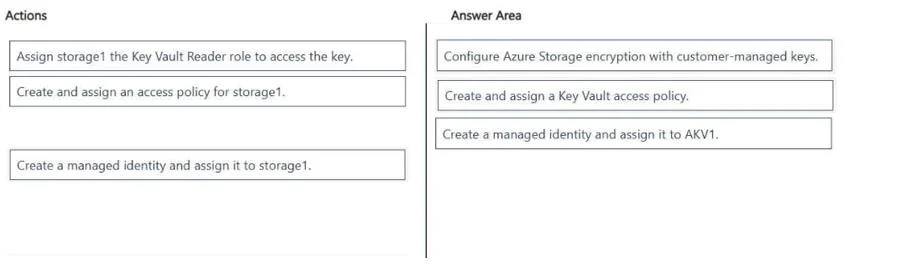
The correct answer is Configure Azure Storage encryption with customer-managed keys.; Create and assign a Key Vault access policy.; Create a managed identity and assign it to AKV1. To secure an Azure Storage account with a customer-managed key from Azure Key Vault, you must first assign a managed identity to the storage account, grant that identity access to the key in the Key Vault, and finally configure the storage account to use the customer-managed key.
Question
Exhibits
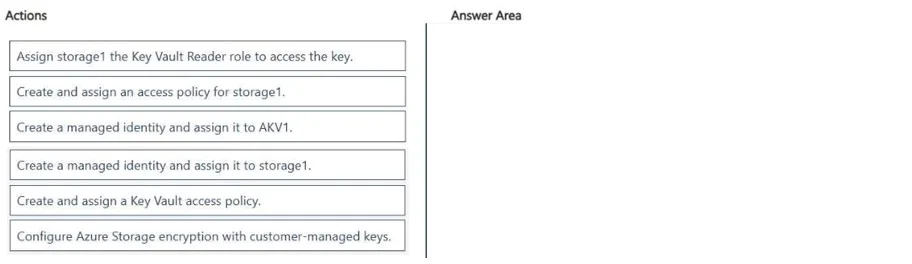
Answer Area
Drag items
Correct arrangement
- Configure Azure Storage encryption with customer-managed keys.
- Create and assign a Key Vault access policy.
- Create a managed identity and assign it to AKV1.
Explanation
To secure an Azure Storage account with a customer-managed key from Azure Key Vault, you must first assign a managed identity to the storage account, grant that identity access to the key in the Key Vault, and finally configure the storage account to use the customer-managed key.
Approach. The correct approach involves three sequential steps to enable customer-managed keys for an Azure Storage account using an Azure Key Vault:
-
Create a managed identity and assign it to storage1.
- Reasoning: The Azure Storage account ('storage1') needs an identity to authenticate to the Azure Key Vault ('AKV1') and request key operations. A system-assigned managed identity is the most secure and recommended way for Azure services to authenticate to other Azure services without managing credentials. This identity acts as the principal that will be granted permissions.
-
Create and assign a Key Vault access policy.
- Reasoning: Once 'storage1' has a managed identity, that identity needs specific permissions within 'AKV1' to perform key operations (Get, Wrap Key, Unwrap Key). These permissions are granted by configuring an access policy on 'AKV1', specifying 'storage1's managed identity and the necessary key permissions. This establishes authorization for the storage account to use the key.
-
Configure Azure Storage encryption with customer-managed keys.
- Reasoning: This is the final step where you instruct 'storage1' to use customer-managed keys for encryption. Within the storage account's encryption settings, you would then specify 'AKV1' as the Key Vault, select the desired key, and link it to the managed identity created in the first step. This completes the configuration, ensuring the storage account uses the specified key for encryption via its managed identity.
Therefore, the correct sequence of actions to drag into the answer area is:
- Create a managed identity and assign it to storage1.
- Create and assign a Key Vault access policy.
- Configure Azure Storage encryption with customer-managed keys.
Common mistakes.
- common_mistake. 1. Incorrect placement/order: A common mistake is to configure storage encryption before the necessary identity and permissions are in place. The identity must exist first, then it must be granted permissions, and only then can the consuming service be configured to use it.
-
'Create a managed identity and assign it to AKV1': This is incorrect. Managed identities are assigned to the client (the resource needing to access another service), not the server (the service being accessed). In this scenario, 'storage1' needs to access 'AKV1', so the managed identity must be assigned to 'storage1', not 'AKV1'. The example in the second image makes this mistake.
-
'Assign storage1 the Key Vault Reader role to access the key': The Key Vault Reader role is generally a control plane role for viewing Key Vault properties. For data plane operations like encrypting/decrypting keys, specific Key Vault access policies with 'Get', 'Wrap Key', and 'Unwrap Key' permissions (or specific data plane RBAC roles for Key Vault) are required. Also, the role would be assigned to the managed identity of 'storage1', not 'storage1' itself directly.
-
'Create and assign an access policy for storage1': This action is too vague and ambiguous. 'Key Vault access policy' is specific to granting permissions on the Key Vault, which is what is needed here. An 'access policy for storage1' could refer to various storage-specific policies (like network access or shared access policies), none of which are relevant for granting Key Vault access.
Concept tested. Azure Storage encryption with customer-managed keys (CMK), Managed Identities for Azure resources, Azure Key Vault access policies, and secure inter-service communication within Azure.
Topics
Community Discussion
No community discussion yet for this question.