
SC-100 · Question #196
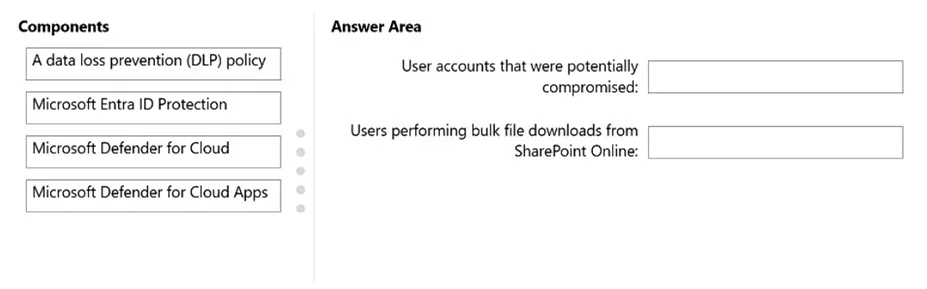
Drag and Drop Question You have a Microsoft 365 subscription. You need to recommend a security solution to monitor the following activities: - User accounts that were potentially compromised - Users…
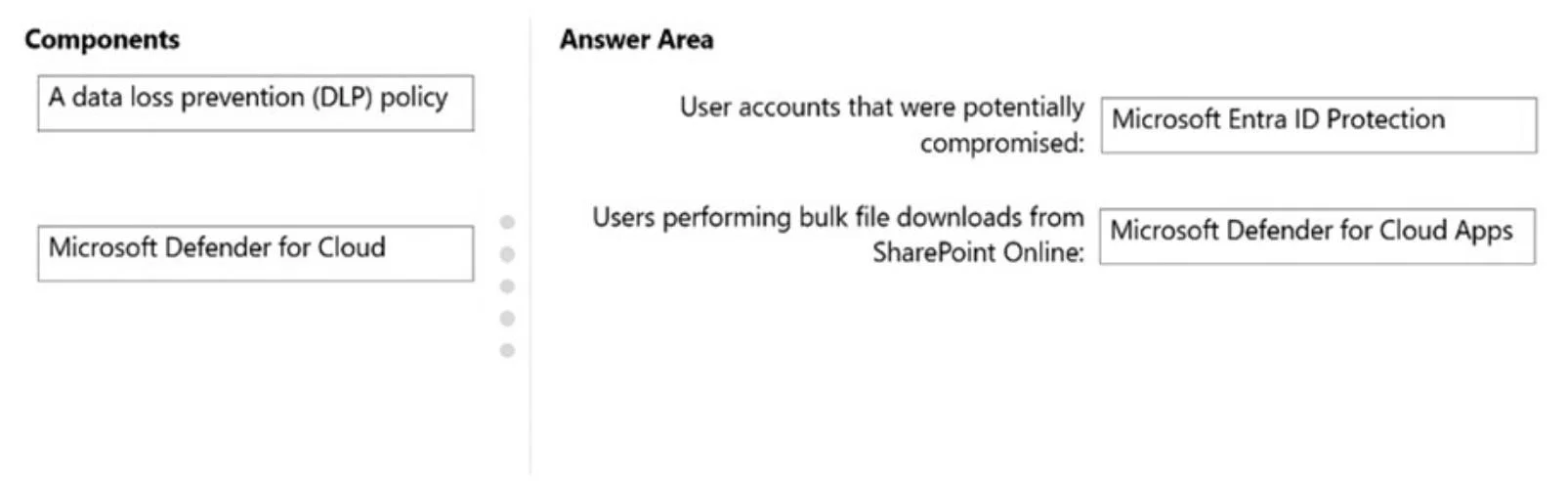
The correct answer is Microsoft Entra ID Protection; Microsoft Defender for Cloud Apps. This question assesses the ability to identify appropriate Microsoft 365 security solutions for monitoring compromised user accounts and bulk file downloads from SharePoint Online.
Question
Exhibits
Answer Area
Drag items
Correct arrangement
- Microsoft Entra ID Protection
- Microsoft Defender for Cloud Apps
Explanation
This question assesses the ability to identify appropriate Microsoft 365 security solutions for monitoring compromised user accounts and bulk file downloads from SharePoint Online.
Approach. To answer correctly, drag 'Microsoft Entra ID Protection' to the 'User accounts that were potentially compromised:' box. Microsoft Entra ID Protection is specifically designed to detect, investigate, and remediate identity-based risks, including sign-ins from unfamiliar locations, impossible travel, leaked credentials, and other anomalies that indicate a potentially compromised account. Then, drag 'Microsoft Defender for Cloud Apps' to the 'Users performing bulk file downloads from Microsoft SharePoint Online:' box. Microsoft Defender for Cloud Apps (MDCA) functions as a Cloud Access Security Broker (CASB) and provides deep visibility into activities within sanctioned cloud applications like SharePoint Online. It can detect anomalous behaviors, such as unusually large downloads or uploads, which are indicative of bulk file downloads, and can be configured to alert on such activities.
Common mistakes.
- common_mistake. Using 'A data loss prevention (DLP) policy' for monitoring bulk file downloads is incorrect because DLP policies are primarily designed to prevent sensitive data from being shared or exfiltrated, based on content sensitivity. While a DLP policy could block or audit certain downloads, its core function is prevention and classification, not general activity monitoring for 'bulk file downloads' as an anomalous user behavior. 'Microsoft Defender for Cloud' is incorrect because it focuses on protecting Azure (and other cloud) workloads and resources (servers, databases, storage) and cloud security posture management (CSPM), not directly on monitoring user activity within SaaS applications like SharePoint Online or identifying compromised user accounts in Microsoft Entra ID. While 'Microsoft Defender for Cloud Apps' could potentially integrate with DLP policies for enforcement, its direct role in monitoring user behavior anomalies in SaaS apps makes it the better fit for monitoring bulk downloads.
Concept tested. The core concept tested is the ability to differentiate between various Microsoft 365 security services - specifically Microsoft Entra ID Protection, Microsoft Defender for Cloud Apps, and Data Loss Prevention (DLP) - and understand their primary capabilities and use cases for identity protection and cloud application security monitoring.
Topics
Community Discussion
No community discussion yet for this question.