
SC-100 · Question #188
Drag and Drop Question You have a hybrid Azure AD tenant that has pass-through authentication enabled. You are designing an identity security strategy. You need to minimize the impact of brute force…
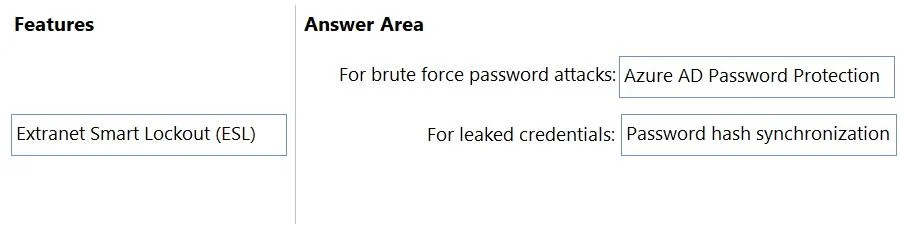
The correct answer is Azure AD Password Protection; Password hash synchronization. This question assesses knowledge of Azure AD identity security features for hybrid environments, specifically how to mitigate brute force password attacks and the impact of leaked credentials.
Question
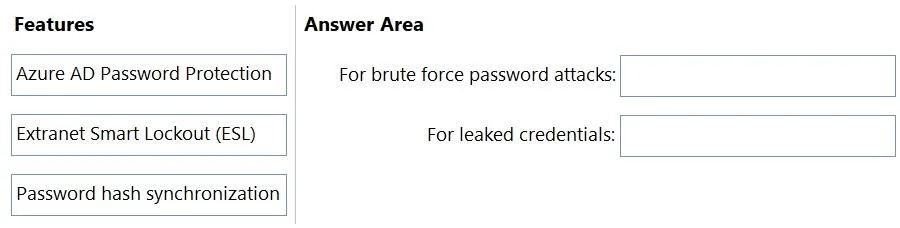
Drag and Drop Question You have a hybrid Azure AD tenant that has pass-through authentication enabled. You are designing an identity security strategy. You need to minimize the impact of brute force password attacks and leaked credentials of hybrid identities. What should you include in the design? To answer, drag the appropriate features to the correct requirements. Each feature may be used once, more than once, or not at all. You may need to drag the split bar between panes or scroll to view content. NOTE: Each correct selection is worth one point. Answer:
Exhibits
Answer Area
Drag items
Correct arrangement
- Azure AD Password Protection
- Password hash synchronization
Explanation
This question assesses knowledge of Azure AD identity security features for hybrid environments, specifically how to mitigate brute force password attacks and the impact of leaked credentials.
Approach. To answer the question, the test-taker must correctly associate each security feature with the type of attack it primarily mitigates in a hybrid Azure AD tenant with Pass-through Authentication (PTA) enabled.
-
For brute force password attacks: Azure AD Password Protection Azure AD Password Protection helps minimize the impact of brute force attacks by preventing users from setting passwords that are known to be weak, commonly used, or have been previously compromised and appear in global or custom banned password lists. By proactively blocking such passwords, it significantly reduces the likelihood of a brute force attack succeeding, as the attacker would be unable to guess or use a weak or compromised password for a valid account.
-
For leaked credentials: Password hash synchronization In a hybrid environment, Pass-through Authentication relies on on-premises Active Directory for primary authentication. However, to effectively detect leaked credentials for these hybrid identities, Azure AD needs access to their password information. When Password hash synchronization (PHS) is enabled, a hash of the user's on-premises password is synchronized to Azure AD. This allows Azure AD Identity Protection to compare these synchronized hashes against known leaked credential databases. If a match is found, Azure AD can then flag the account as compromised, force a password reset, or apply other conditional access policies, thereby minimizing the impact of the leaked credential for hybrid users.
Common mistakes.
- common_mistake. A common mistake would be to choose 'Extranet Smart Lockout (ESL)'. ESL is a feature primarily designed for AD FS (Active Directory Federation Services) to protect against brute-force attacks by locking out accounts when too many failed login attempts occur from external sources. The scenario explicitly states that the tenant has 'pass-through authentication enabled', which means AD FS is not being used for authentication to Azure AD. Therefore, ESL is not relevant in this specific scenario. Azure AD has its own built-in Smart Lockout feature for cloud-authenticated accounts (including those using PTA).
Another mistake might be to confuse the primary function of Azure AD Password Protection with Password hash synchronization for leaked credentials. While Azure AD Password Protection does prevent users from setting leaked passwords, Password hash synchronization is the underlying mechanism that enables Azure AD to detect if a hybrid user's existing password has been leaked by comparing the synchronized hash against known compromised lists. Therefore, PHS is critical for detecting and responding to existing leaked credentials for hybrid identities.
Concept tested. Azure Active Directory identity security features, including password protection, smart lockout mechanisms, and hybrid identity synchronization methods (Pass-through Authentication vs. Password Hash Synchronization) and their respective roles in mitigating brute force attacks and credential compromise.
Reference. null
Topics
Community Discussion
No community discussion yet for this question.