
SALESFORCE-ASSOCIATE · Question #32
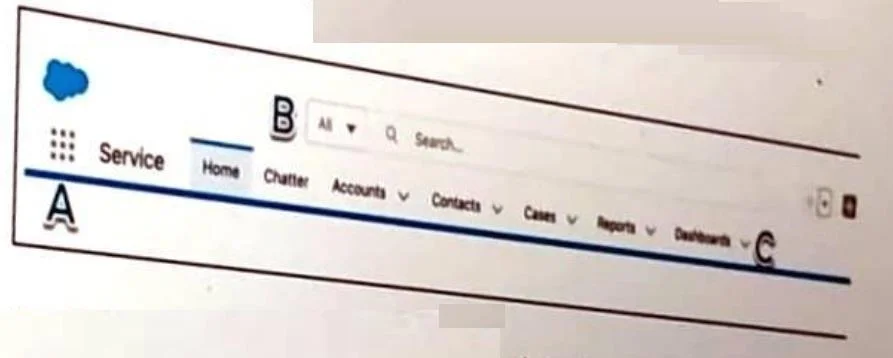
Refer to the screenshot that shows the top portion of the Salesforce Service app with areas labeled A, B, and C. Get Cloudy Consulting (GCC) offers sales and services consoles to meet the various…
The correct answer is A. App Launcher icon (Label A). In Salesforce Lightning, the App Launcher (the nine-dot grid icon, labeled A) is the central hub for switching between different Salesforce apps. To move from the Service Console app to the Sales Console app, users click the App Launcher icon and select the desired app from the…
Question
Refer to the screenshot that shows the top portion of the Salesforce Service app with areas labeled A, B, and C. Get Cloudy Consulting (GCC) offers sales and services consoles to meet the various needs of its end users? Where should GCC' end users go to change to the Sales Console.
Exhibit
Options
- AApp Launcher icon (Label A)
- BSearch bar (Label b)
- CA dropdown in the navigation bar (Label C)
How the community answered
(49 responses)- A90% (44)
- B6% (3)
- C4% (2)
Explanation
In Salesforce Lightning, the App Launcher (the nine-dot grid icon, labeled A) is the central hub for switching between different Salesforce apps. To move from the Service Console app to the Sales Console app, users click the App Launcher icon and select the desired app from the list. The search bar (Label B) is for finding records and data, and the navigation bar dropdown (Label C) is for switching between tabs and objects within the current app-not for switching apps entirely.
Topics
Community Discussion
No community discussion yet for this question.