
PSE-PLATFORM · Question #67
The IT department has received complaints abou VoIP call jitter when the sales staff is making or receiving calls. QoS is enabled on all firewall interfaces, but there is no QoS policy written in the
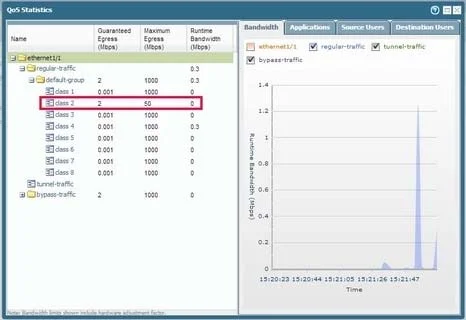
The correct answer is D. Network Activity. Explanation/Reference: Select Network > QoS to view the QoS Policies page and click the Statistics link to view QoS bandwidth, active sessions of a selected QoS node or class, and active applications for the selected QoS node or class. For example, see the statistics for ethernet
Question
The IT department has received complaints abou VoIP call jitter when the sales staff is making or receiving calls. QoS is enabled on all firewall interfaces, but there is no QoS policy written in the rulebase. The IT manager wants to find out what traffic is causing the jitter in real time when a user reports the jitter. Which feature can be used to identify, in real time, the applications taking up the most bandwidth?
Exhibit
Options
- AQoS Statistics
- BBandwidth Activity
- CThreat Activity
- DNetwork Activity
How the community answered
(43 responses)- A7% (3)
- B5% (2)
- C16% (7)
- D72% (31)
Explanation
Explanation/Reference: Select Network > QoS to view the QoS Policies page and click the Statistics link to view QoS bandwidth, active sessions of a selected QoS node or class, and active applications for the selected QoS node or class. For example, see the statistics for ethernet 1/1 with QoS enabled: Explanation/Reference: The Network Activity tab of the Application Command Center (ACC) displays an overview of traffic and user activity on your network including: Top applications in use Top users who generate traffic (with a drill down into the bytes, content, threats or URLs accessed by the user) Most used security rules against which traffic matches occur In addition, you can also view network activity by source or destination zone, region, or IP address, ingress or egress interfaces, and GlobalProtect host information such as the operating systems of the devices most commonly used on the network.
Topics
Community Discussion
No community discussion yet for this question.