
PROFESSIONAL-CLOUD-NETWORK-ENGINEER · Question #167
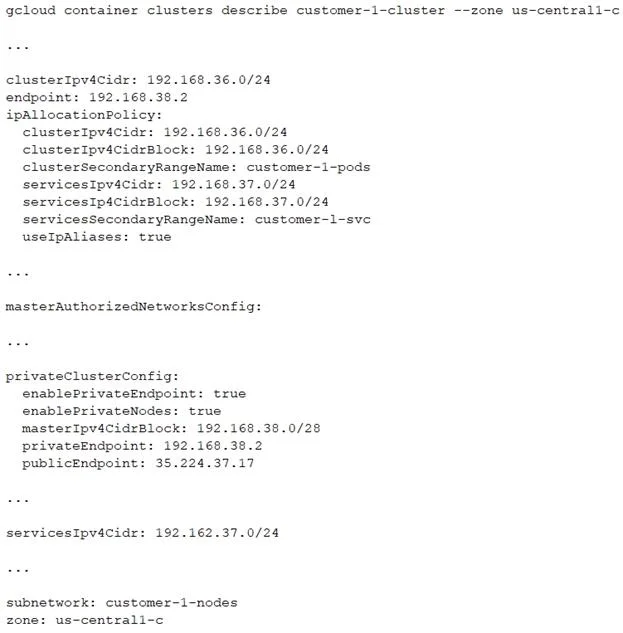
You have the following private Google Kubernetes Engine (GKE) cluster deployment: You have a virtual machine (VM) deployed in the same VPC in the subnetwork kubernetes- management with internal IP…
The correct answer is A. Add the network 192.168.40.0/24 to the masterAuthorizedNetworksConfig. The VM has an internal IP of 192.168.40.2/24, placing it in the 192.168.40.0/24 subnet. For a private GKE cluster, the master's endpoint is only accessible from networks explicitly listed in masterAuthorizedNetworksConfig. Since the VM has no external IP, you must authorize its…
Question
Exhibit
Options
- AAdd the network 192.168.40.0/24 to the masterAuthorizedNetworksConfig.
- BAdd the network 192.168.38.0/28 to the masterAuthorizedNetworksConfig.
- CAdd the network 192.168.36.0/24 to the masterAuthorizedNetworksConfig.
- DAdd an external IP address to the VM, and add this IP address in the
How the community answered
(57 responses)- A74% (42)
- B4% (2)
- C16% (9)
- D7% (4)
Explanation
The VM has an internal IP of 192.168.40.2/24, placing it in the 192.168.40.0/24 subnet. For a private GKE cluster, the master's endpoint is only accessible from networks explicitly listed in masterAuthorizedNetworksConfig. Since the VM has no external IP, you must authorize its internal subnet - 192.168.40.0/24 - to allow kubectl traffic to reach the private master endpoint. Adding a different subnet (options B or C) would not authorize the VM's actual source address. Adding an external IP (option D) would change the VM's egress path and expose it unnecessarily, which is not required when the VPC has internal routing to the master.
Topics
Community Discussion
No community discussion yet for this question.