
PROFESSIONAL-CLOUD-NETWORK-ENGINEER · Question #141
You have the following firewall ruleset applied to all instances in your Virtual Private Cloud (VPC): You need to update the firewall rule to add the following rule to the ruleset: You are using a…
The correct answer is A. Assign the compute.securityAdmin and logging.viewer rule to the new user account. Apply the. To modify VPC firewall rules at the project level, the compute.securityAdmin role is required. This role grants permissions to create, update, and delete firewall rules within a project. To view firewall logs in Cloud Logging, the logging.viewer role is required, which grants…
Question
Exhibit
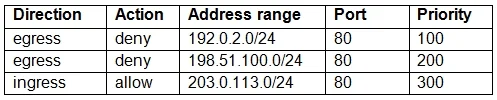
Options
- AAssign the compute.securityAdmin and logging.viewer rule to the new user account. Apply the
- BAssign the compute.securityAdmin and logging.bucketWriter role to the new user account. Apply
- CAssign the compute.orgSecurityPolicyAdmin and logging.viewer role to the new user account.
- DAssign the compute.orgSecurityPolicyAdmin and logging.bucketWriter role to the new user
How the community answered
(26 responses)- A73% (19)
- B8% (2)
- C15% (4)
- D4% (1)
Explanation
To modify VPC firewall rules at the project level, the compute.securityAdmin role is required. This role grants permissions to create, update, and delete firewall rules within a project. To view firewall logs in Cloud Logging, the logging.viewer role is required, which grants read-only access to log entries. Option B is wrong because logging.bucketWriter grants permission to write logs to log buckets, not to view them. Options C and D are wrong because compute.orgSecurityPolicyAdmin is for managing hierarchical firewall policies at the organization or folder level, not for managing standard VPC firewall rules at the project level. Since this is a project-level firewall rule update, compute.securityAdmin is the correct role.
Topics
Community Discussion
No community discussion yet for this question.