
PL-500 · Question #64
Drag and Drop Question You are editing a cloud flow in the Power Automate flow designer. You need to resubmit the most recent trigger. Which five actions should you perform in sequence? To answer…
The correct answer is Select Test.; Select Automatically.; Select With a recently used trigger.; Select the run you want to resubmit.; Select Save and Test. The question assesses the ability to correctly sequence the actions required to resubmit a Power Automate cloud flow using data from a recently used trigger.
Question
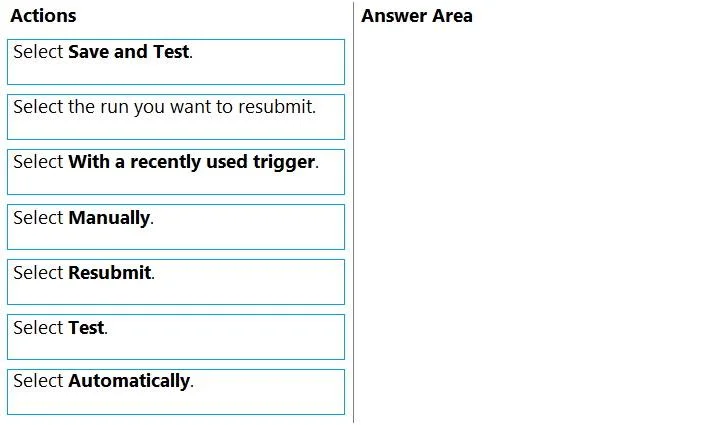
Drag and Drop Question You are editing a cloud flow in the Power Automate flow designer. You need to resubmit the most recent trigger. Which five actions should you perform in sequence? To answer, move the appropriate actions from the list of actions to the answer area and arrange them in the correct order. Answer:
Exhibit
Answer Area
Drag items
Correct arrangement
- Select Test.
- Select Automatically.
- Select With a recently used trigger.
- Select the run you want to resubmit.
- Select Save and Test.
Explanation
The question assesses the ability to correctly sequence the actions required to resubmit a Power Automate cloud flow using data from a recently used trigger.
Approach. To resubmit a cloud flow's most recent trigger in Power Automate, the following five actions must be performed in sequence:
- Select Test. - This is the initial step to access the testing and run options for a flow.
- Select Automatically. - After selecting 'Test,' this option is chosen to indicate that the flow should run without manual input, typically by reusing previous trigger data.
- Select With a recently used trigger. - This option becomes available after 'Automatically' is selected and specifies that the system should utilize data from a past trigger instance.
- Select the run you want to resubmit. - Following the selection of 'With a recently used trigger,' the user is presented with a list of previous flow runs. From this list, the specific run whose trigger data needs to be reused is selected.
- Select Resubmit. - This is the final action that initiates the re-execution of the flow using the trigger data from the previously selected run.
Common mistakes.
- common_mistake. Common mistakes include selecting 'Save and Test' instead of 'Test' followed by specific run options, as 'Save and Test' is primarily for testing new changes rather than resubmitting a past trigger. Selecting 'Manually' is also incorrect because it triggers the flow with new input rather than reusing existing trigger data from a previous run. Additionally, choosing the correct actions but arranging them in the wrong sequence will lead to an incorrect answer, as the order of interaction within the Power Automate UI is crucial for successful flow execution and management.
Concept tested. The core concept being tested is the test and re-run functionality within Power Automate cloud flows, specifically the process of resubmitting a flow using data from a previous trigger instance. This requires understanding the user interface options and their sequential application for flow management and debugging.
Topics
Community Discussion
No community discussion yet for this question.