
PL-300 · Question #84
You have a Power BI Desktop project that has the model shown in the exhibit. (Click the Exhibit tab.) Customer Count is a measure that uses the CountRows function to calculate the number of…
The correct answer is A. Modify the table relationship between the Customers table and the Sales table to use a Cross. COUNTROWS on the Customers table requires the filter context from Products to flow through Sales and then into Customers. By default, relationship filtering is single-directional (from the 'one' side to the 'many' side). The Products filter reaches Sales, but without…
Question
You have a Power BI Desktop project that has the model shown in the exhibit. (Click the Exhibit tab.) Customer Count is a measure that uses the CountRows function to calculate the number of customers. You create a table visualization that displays ProductID, Product, and Customer Count. When you view the table, you discover that Customer Count always displays the total number of customers instead of the number of customers who purchased the product. You need to ensure that the table visualization displays the number of customers who purchased each product. What should you do?
Exhibit
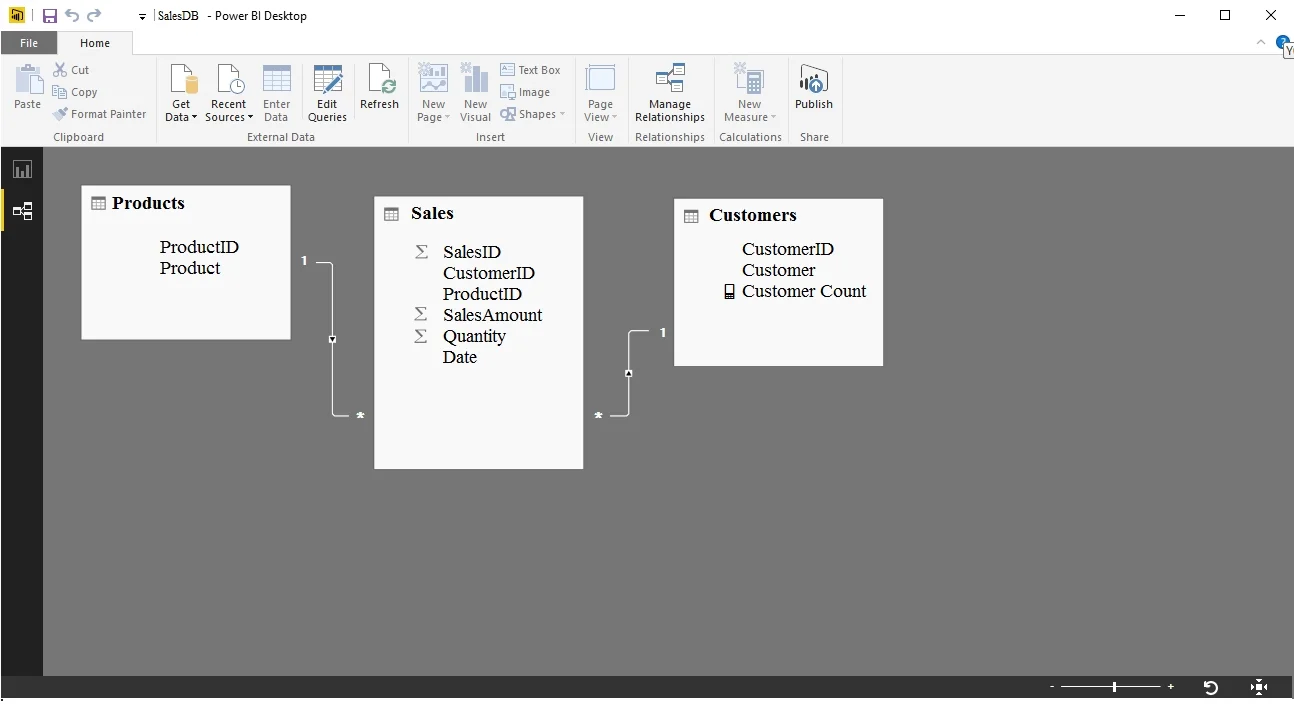
Options
- AModify the table relationship between the Customers table and the Sales table to use a Cross
- BModify the Customer Count measure to use the COUNT function.
- CModify the Customer Count measure to use the COUNTX function.
- DModify the table relationship between the Products table and the Sales table to use a Cross filter
How the community answered
(43 responses)- A74% (32)
- B16% (7)
- C7% (3)
- D2% (1)
Explanation
COUNTROWS on the Customers table requires the filter context from Products to flow through Sales and then into Customers. By default, relationship filtering is single-directional (from the 'one' side to the 'many' side). The Products filter reaches Sales, but without bidirectional cross-filtering on the Customers–Sales relationship, it cannot further filter the Customers table. Enabling cross-filter direction (bidirectional) on that relationship allows the product context to propagate through Sales to Customers, giving the correct per-product customer count. Switching to COUNT or COUNTX would not fix the filter propagation issue.
Topics
Community Discussion
No community discussion yet for this question.