
PL-300 · Question #167
In Power BI Desktop, you are building a sales report that contains two tables. Both tables have row-level security (RLS) configured. You need to create a relationship between the tables. The…
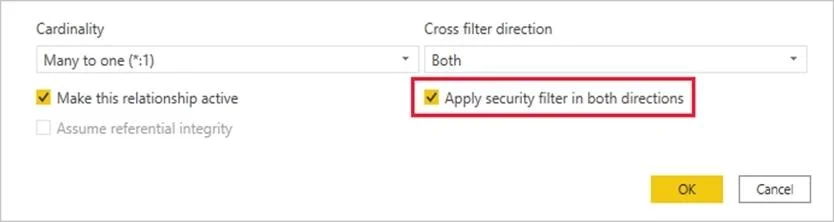
The correct answer is D. Create an active relationship between the tables and select Apply security filter in both. By default, row-level security filtering uses single-directional filters, whether the relationships are set to single direction or bi-directional. You can manually enable bi-directional cross-filtering with row-level security by selecting the relationship and checking the Apply…
Question
In Power BI Desktop, you are building a sales report that contains two tables. Both tables have row-level security (RLS) configured. You need to create a relationship between the tables. The solution must ensure that bidirectional cross-filtering honors the RLS settings. What should you do?
Exhibit
Options
- ACreate an active relationship between the tables and select Assume referential integrity.
- BCreate an inactive relationship between the tables and select Assume referential integrity.
- CCreate an inactive relationship between the tables and select Apply security filter in both
- DCreate an active relationship between the tables and select Apply security filter in both
How the community answered
(44 responses)- A7% (3)
- B7% (3)
- C2% (1)
- D84% (37)
Explanation
By default, row-level security filtering uses single-directional filters, whether the relationships are set to single direction or bi-directional. You can manually enable bi-directional cross-filtering with row-level security by selecting the relationship and checking the Apply security filter in both directions checkbox. Select this option when you've also implemented dynamic row-level security at the server level, where row-level security is based on username or login ID. https://docs.microsoft.com/en-us/power-bi/admin/service-admin-rls
Topics
Community Discussion
No community discussion yet for this question.