
PL-300 · Question #65
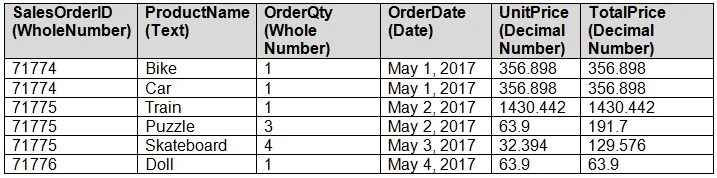
You have a table named Sales. A sample of the data in Sales is shown in the following table. You create a stacked column chart visualization that displays ProductName by Date. You discover that the…
The correct answer is A. Create a new table that has columns for the date, year, week, and day. When individual dates appear on the axis instead of a date hierarchy, the root cause is typically a missing proper date/calendar table. Creating a dedicated table with explicit Date, Year, Week, and Day columns gives Power BI the structured hierarchy it needs to group by year…
Question
You have a table named Sales. A sample of the data in Sales is shown in the following table. You create a stacked column chart visualization that displays ProductName by Date. You discover that the axis for the visualization displays all the individual dates. You need to ensure that the visualization displays ProductName by year and that you can drill down to see ProductName by week and day. What should you do first?
Exhibit
Options
- ACreate a new table that has columns for the date, year, week, and day.
- BCreate a new hierarchy in the Sales table.
- CFormat the visualization and set the type of the X-Axis to Categorical.
- DConfigure a visual filter for the Date column that uses an advanced filter.
How the community answered
(48 responses)- A83% (40)
- B4% (2)
- C10% (5)
- D2% (1)
Explanation
When individual dates appear on the axis instead of a date hierarchy, the root cause is typically a missing proper date/calendar table. Creating a dedicated table with explicit Date, Year, Week, and Day columns gives Power BI the structured hierarchy it needs to group by year and enable drill-down to week and day. This must happen first-before building the hierarchy or adjusting the visual-because the hierarchy columns don't exist in the Sales table yet.
Topics
Community Discussion
No community discussion yet for this question.