
PL-300 · Question #471
You have a table named DIMCountries that contains a column named Country as shown in the following table. You plan to use DIMCountries as a dimension in a report. You need to ensure that the Country…
The correct answer is B. Remove duplicate values. E. Apply a Capitalize Each Word transform. E: The ‘Capitalize Each Word’ command is a feature in Power BI that converts text data into a standardized format by capitalizing the first letter of each word. This command is particularly useful when working with datasets containing names, titles, or any other text that…
Question
You have a table named DIMCountries that contains a column named Country as shown in the following table. You plan to use DIMCountries as a dimension in a report. You need to ensure that the Country column in DIMCountries lists each country only once. Which two actions should you perform on the Country column? Each correct answer presents part of the solution. NOTE: Each correct answer is worth one point.
Exhibit
Options
- AChange Data category to Country
- BRemove duplicate values.
- CApply a clean transform.
- DReplace the empty fields.
- EApply a Capitalize Each Word transform.
How the community answered
(25 responses)- A12% (3)
- B76% (19)
- C8% (2)
- D4% (1)
Explanation
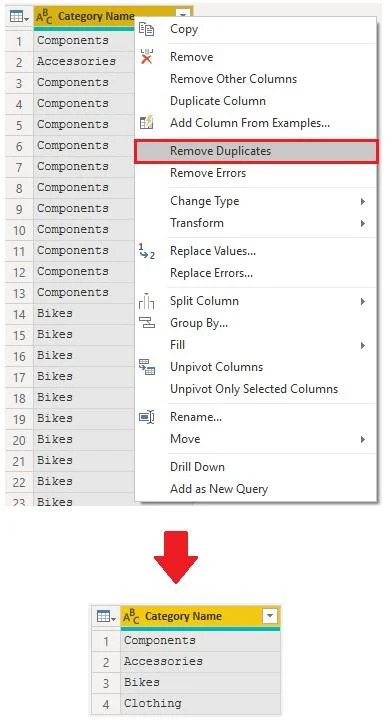
E: The ‘Capitalize Each Word’ command is a feature in Power BI that converts text data into a standardized format by capitalizing the first letter of each word. This command is particularly useful when working with datasets containing names, titles, or any other text that requires consistent formatting. B: Remove duplicates You can remove duplicates from columns to only keep unique names in a selected column by using the Remove Duplicates feature in Power Query. In this example, notice that the Category Name column contains duplicates for each category. As a result, you want to create a table with unique categories and use it in your semantic model. You can achieve this action by selecting a column, right-clicking on the header of the column, and then selecting the Remove Duplicates option.
Community Discussion
No community discussion yet for this question.