
PL-300 · Question #362
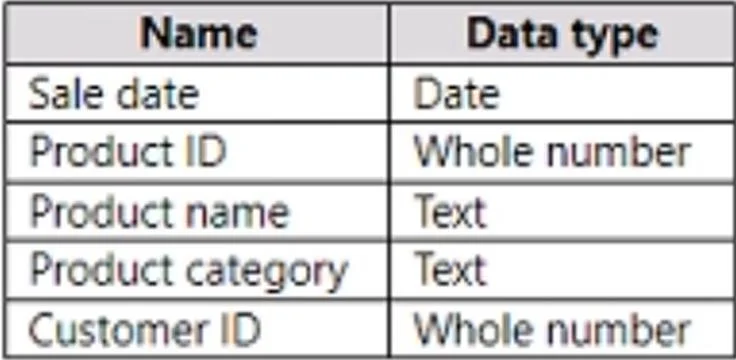
In Power Query Editor, you have a query named Sales Data that contains the following columns. You need to create two queries named Product Dimension and Sales Fact based on the Sales Data query. The…
The correct answer is A. Reference the Sales Data query to create the new queries. E. Disable the load for the Sales Data query. Option A - Reference (not Duplicate) the Sales Data query - is correct because a Reference creates a dependent query that reads from Sales Data as its source. Any upstream changes to Sales Data automatically propagate to Product Dimension and Sales Fact, minimizing maintenance…
Question
In Power Query Editor, you have a query named Sales Data that contains the following columns. You need to create two queries named Product Dimension and Sales Fact based on the Sales Data query. The solution must minimize maintenance effort and the size of the dataset. Which two actions should you perform? Each correct answer presents part of the solution. NOTE: Each correct selection is worth one point.
Exhibit
Options
- AReference the Sales Data query to create the new queries.
- BDisable the load for the Sales Fact query.
- CDuplicate the Sales Data query to create the new queries.
- DClear Include in report refresh for the Sales Data query.
- EDisable the load for the Sales Data query.
How the community answered
(39 responses)- A72% (28)
- B5% (2)
- C8% (3)
- D15% (6)
Explanation
Option A - Reference (not Duplicate) the Sales Data query - is correct because a Reference creates a dependent query that reads from Sales Data as its source. Any upstream changes to Sales Data automatically propagate to Product Dimension and Sales Fact, minimizing maintenance. Duplicating (Option C) creates independent copies that must be updated separately when Sales Data changes. Option E - Disable load for the Sales Data query - is correct because once Product Dimension and Sales Fact are derived from it, loading Sales Data itself into the model creates a redundant third table, inflating dataset size unnecessarily. Disabling load keeps it as an intermediate transformation step only. Option B (disable Sales Fact) would prevent the fact table from loading into the model, breaking the report. Option D (Clear Include in report refresh) only affects whether the query participates in refresh cycles, not whether it loads into the model.
Community Discussion
No community discussion yet for this question.