
PL-300 · Question #357
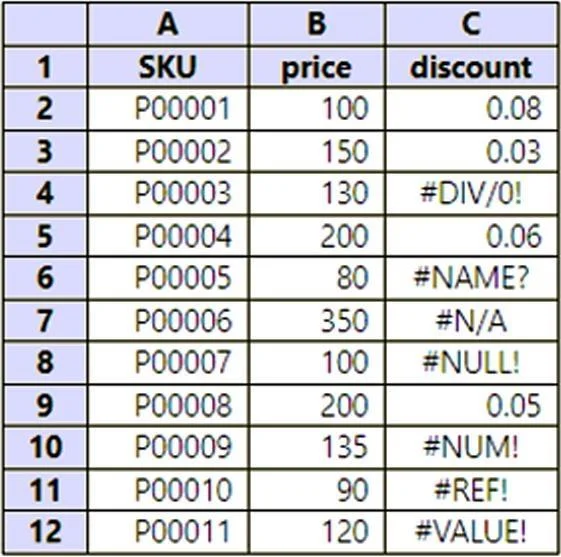
You have data in a Microsoft Excel worksheet as shown in the following table. You need to use Power Query to clean and transform the dataset. The solution must meet the following requirements: - If…
The correct answer is A. Select Replace Errors. By selecting "Replace Errors" in Power Query Editor, you can specify a value (in this case, 0.05) to be used whenever an error is encountered in the specified column (discount column). This ensures that if the discount column returns an error, a discount of 0.05 will be used…
Question
You have data in a Microsoft Excel worksheet as shown in the following table. You need to use Power Query to clean and transform the dataset. The solution must meet the following requirements:
- If the discount column returns an error, a discount of 0.05 must be
used.
- All the rows of data must be maintained.
- Administrative effort must be minimized.
What should you do in Power Query Editor?
Exhibit
Options
- ASelect Replace Errors.
- BEdit the query in the Query Errors group.
- CSelect Remove Errors.
- DSelect Keep Errors.
How the community answered
(35 responses)- A74% (26)
- B6% (2)
- C17% (6)
- D3% (1)
Explanation
By selecting "Replace Errors" in Power Query Editor, you can specify a value (in this case, 0.05) to be used whenever an error is encountered in the specified column (discount column). This ensures that if the discount column returns an error, a discount of 0.05 will be used, while maintaining all rows of data and minimizing administrative effort.
Community Discussion
No community discussion yet for this question.