
PL-300 · Question #271
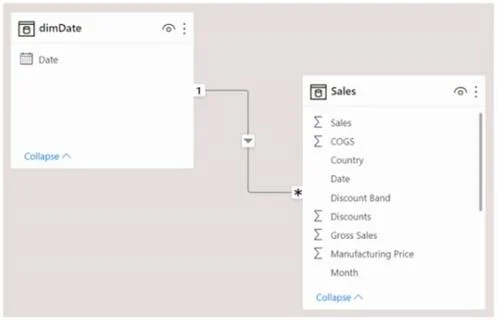
You have the Power BI data model shown in the following exhibit. The Sales table contains records of sales by day from the last five years up until today's date. You plan to create a measure to…
The correct answer is C. Calculate (SUM(Sales[Sales]), SAMEPERIODLASTYEAR(dimDate[Date] )). To return the total sales of March 2021 when March 2022 is selected, you must use a DAX expression that shifts the date context to the equivalent period in the previous year. The SAMEPERIODLASTYEAR function within CALCULATE correctly achieves this time intelligence shift.
Question
You have the Power BI data model shown in the following exhibit. The Sales table contains records of sales by day from the last five years up until today’s date. You plan to create a measure to return the total sales of March 2021 when March 2022 is selected. Which DAX expression should you use?
Exhibit
Options
- ACalculate (Sum(Sales[Sales]), PREVIOUSYEAR( dimDate[Date])
- BTOTALYTD (SUM(Sales[Sales]), dimDate[Date] )
- CCalculate (SUM(Sales[Sales]), SAMEPERIODLASTYEAR(dimDate[Date] ))
- DSUM(Sales[Sales])
How the community answered
(22 responses)- A9% (2)
- B5% (1)
- C86% (19)
Why each option
To return the total sales of March 2021 when March 2022 is selected, you must use a DAX expression that shifts the date context to the equivalent period in the previous year. The `SAMEPERIODLASTYEAR` function within `CALCULATE` correctly achieves this time intelligence shift.
The `PREVIOUSYEAR` function returns all dates for the *entire* previous year (e.g., all of 2021) based on the current context, rather than the specific corresponding period (e.g., only March 2021).
The `TOTALYTD` function calculates the year-to-date total for the current filter context, which is not the requirement of retrieving sales for a specific prior month.
The `SAMEPERIODLASTYEAR` DAX function is specifically designed to shift the current date filter context back by one year while preserving the month and day context. When `March 2022` is selected, `SAMEPERIODLASTYEAR(dimDate[Date])` returns a table of dates for `March 2021`, enabling `CALCULATE(SUM(Sales[Sales]), ...)` to correctly sum sales for that precise prior period.
`SUM(Sales[Sales])` alone would only return the sum of sales for the currently selected period (March 2022) without any time intelligence function to shift the context to the previous year.
Concept tested: DAX time intelligence with SAMEPERIODLASTYEAR
Source: https://learn.microsoft.com/en-us/dax/sameperiodlastyear-function-dax
Community Discussion
No community discussion yet for this question.