
PL-300 · Question #267
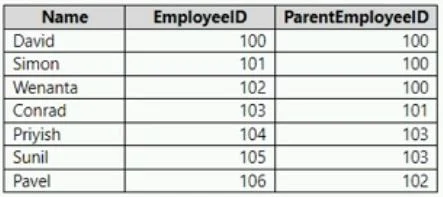
You have a Power BI model that contains a table named Employee. The table contains the following data. Each employee has one manager as shown in the ParentEmployeeID column. All reporting paths lead…
The correct answer is A. PATHLENGTH(PATH(Employee[EmployeeID],Employee[ParentEmployeeID])). PATH returns a string containing "the identifiers of all the parents to the current identifier", whereas PATHLENGTH returns "the number of items that are parents to the specified item." https://learn.microsoft.com/en-us/dax/path-function-dax
Question
You have a Power BI model that contains a table named Employee. The table contains the following data. Each employee has one manager as shown in the ParentEmployeeID column. All reporting paths lead to the CEO at the top of the organizational hierarchy. You need to create a calculated column that returns the count of levels from each employee to the CEO. Which DAX expression should you use?
Exhibit
Options
- APATHLENGTH(PATH(Employee[EmployeeID],Employee[ParentEmployeeID]))
- BPATHITEM(PATH(Employee[EmployeeID],Employee[ParentEmployeeID]),1,INTEGER)
- CPATHCONTAINS(PATH(Employee[EmployeeID],Employee[ParentEmployeeID]),1)
- DPATH(Employee[EmployeeID],Employee[ParentEmployeeID])
How the community answered
(35 responses)- A71% (25)
- B9% (3)
- C3% (1)
- D17% (6)
Explanation
PATH returns a string containing "the identifiers of all the parents to the current identifier", whereas PATHLENGTH returns "the number of items that are parents to the specified item." https://learn.microsoft.com/en-us/dax/path-function-dax
Community Discussion
No community discussion yet for this question.