
Microsoft
PL-300 · Question #261
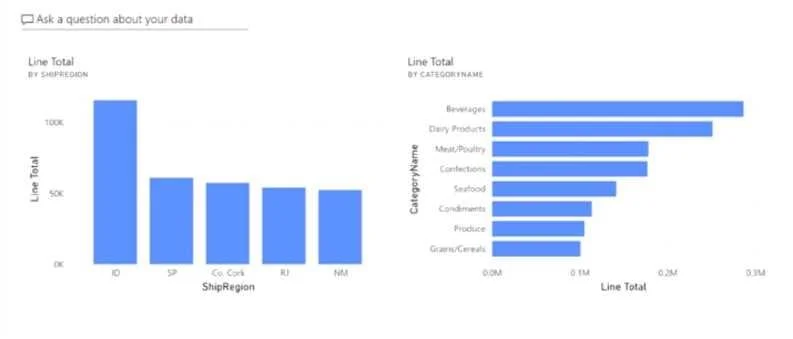
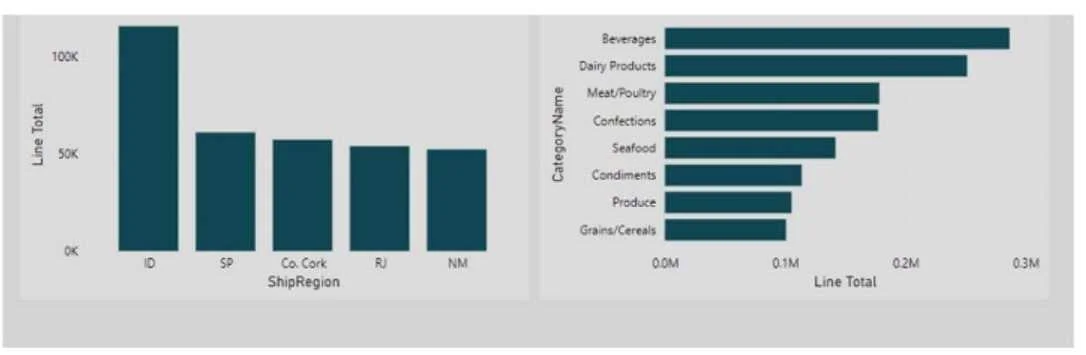
You have the dashboard shown in the following exhibit. You need to modify the dashboard to display as shown in the following exhibit. What should you do?
The correct answer is A. Create and apply a custom dashboard theme. The visual colors can't be changed on the dashboard from a report after the visual has already been pinned. Applying a dashboard custom theme will do it.
Submitted by alyssa_d· Apr 18, 2026
Question
You have the dashboard shown in the following exhibit. You need to modify the dashboard to display as shown in the following exhibit. What should you do?
Exhibits
Options
- ACreate and apply a custom dashboard theme.
- BChange the colors of the visuals in the report.
- CApply the Dark dashboard theme.
- DUpload a snapshot image of the dashboard.
How the community answered
(42 responses)- A76% (32)
- B2% (1)
- C7% (3)
- D14% (6)
Explanation
The visual colors can't be changed on the dashboard from a report after the visual has already been pinned. Applying a dashboard custom theme will do it.
Community Discussion
No community discussion yet for this question.