
PL-300 · Question #228
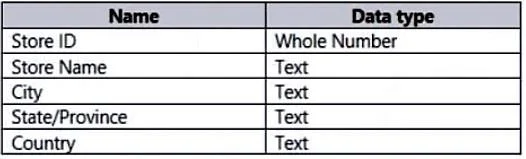
You are creating a Power BI model that contains a table named Store. Store contains the following fields. You plan to create a map visual that will show store locations and provide the ability to…
The correct answer is A. Set the data category of City, State/Province, and Country. A hierarchy is a set of fields categorized in a hierarchical way that one level is the parent of another level. Values of the parent level can be drilled down to the lower level. Create Hierarchy - Right-click on the field you want to set as level 1 of the hierarchy in the…
Question
You are creating a Power BI model that contains a table named Store. Store contains the following fields. You plan to create a map visual that will show store locations and provide the ability to drill down from Country to State/Province to City. What should you do to ensure that the locations are mapped property?
Exhibit
Options
- ASet the data category of City, State/Province, and Country.
- BSet Summarization for City, State/Province, and Country to Don't summarize
- CChange the data type of City, State/Province, and Country.
- DCreate a calculated column that concatenates the values it City, State/Province, and Country.
How the community answered
(31 responses)- A87% (27)
- B3% (1)
- C6% (2)
- D3% (1)
Explanation
A hierarchy is a set of fields categorized in a hierarchical way that one level is the parent of another level. Values of the parent level can be drilled down to the lower level. Create Hierarchy - Right-click on the field you want to set as level 1 of the hierarchy in the fields list, and then select Create Hierarchy. After that, you will see a new hierarchy created named your field name ג €Category ג € plus the word ג €Hierarchy ג €. This would have a hierarchy icon beside it and also an option to expand to the fields of the hierarchy. If you expand, you will see a copy of the Category field in there too. https://radacad.com/what-a-power-bi-hierarchy-is-and-how-to-use-it
Topics
Community Discussion
No community discussion yet for this question.