
PL-100 · Question #327
Drag and Drop Question A company uses Microsoft Power Platform in a production environment. The company is defining new business processes in a prototyping environment. You create components in both…
The correct answer is Unmanaged; Segmented; Managed. This question assesses the test-taker's understanding of Microsoft Power Platform solution types (Managed, Unmanaged, Segmented) and their appropriate use in different environments and for specific deployment scenarios.
Question
Exhibit
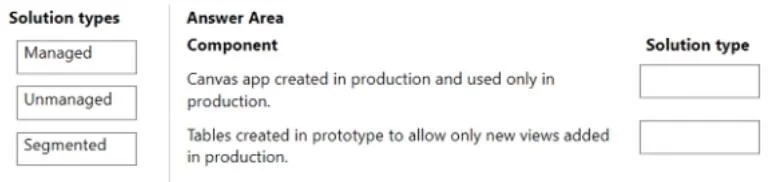
Answer Area
Drag items
Correct arrangement
- Unmanaged
- Segmented
- Managed
Explanation
This question assesses the test-taker's understanding of Microsoft Power Platform solution types (Managed, Unmanaged, Segmented) and their appropriate use in different environments and for specific deployment scenarios.
Approach. The correct interaction is to drag the 'Managed' solution type to the 'Canvas app created in production and used only in production' component, and the 'Segmented' solution type to the 'Tables created in prototype to allow only new views added in production' component.
- Canvas app created in production and used only in production - Managed: Managed solutions are intended for deployment to any environment that isn't a development environment, such as production, test, or UAT environments. They provide a robust lifecycle management experience, allowing for easy updates, upgrades, and uninstallation without leaving residual components. For an application used exclusively in production, a managed solution ensures consistency, control, and simplified maintenance, preventing unapproved customizations in the target environment.
- Tables created in prototype to allow only new views added in production - Segmented: Segmented solutions are used when you need to package and deploy only a specific subset of components from a larger solution or an existing component. In this scenario, new tables were created in a prototype, but the requirement is to only add new views related to these tables in production, implying that the tables themselves might already exist or that only specific modifications (views) are needed. A segmented solution allows for this granular packaging and deployment, preventing the need to deploy entire tables or other unrelated components, and enabling precise updates or additions to existing components in the production environment.
Common mistakes.
- common_mistake. - Using 'Unmanaged' for the Canvas app in production: Unmanaged solutions are primarily used in development environments. When an unmanaged solution is imported into an environment, all its components become fully customizable in that environment. This is highly undesirable for a production environment as it introduces risks of uncontrolled changes, makes updates complex, and hinders proper application lifecycle management (ALM). Production deployments should always use managed solutions.
- Using 'Unmanaged' for the Tables/Views scenario: For the same reasons as above, unmanaged solutions are not suitable for controlled deployments to production environments, especially when specific, incremental updates like adding 'only new views' are required. It would make the tables and views unmanaged in production, undermining ALM best practices.
- Using 'Managed' for 'Tables created in prototype to allow only new views added in production': While managed solutions are for production, the specific requirement 'allow only new views added' implies a partial or incremental update to an existing component (tables). A standard managed solution would typically package the entire table, and importing it might lead to overwriting existing configurations or not achieving the precise 'add only new views' goal. Segmented solutions are designed for this exact purpose of deploying a subset of components or incremental changes.
Concept tested. Microsoft Power Platform solution types (Managed, Unmanaged, Segmented), their differences, and best practices for their use in application lifecycle management (ALM) across development, prototyping, and production environments, with a focus on deploying and updating components efficiently and safely.
Reference. https://learn.microsoft.com/en-us/power-apps/maker/data-platform/managed-unmanaged-solutions https://learn.microsoft.com/en-us/power-apps/maker/data-platform/org-migrate-segmented-solutions
Topics
Community Discussion
No community discussion yet for this question.