
PL-100 · Question #204
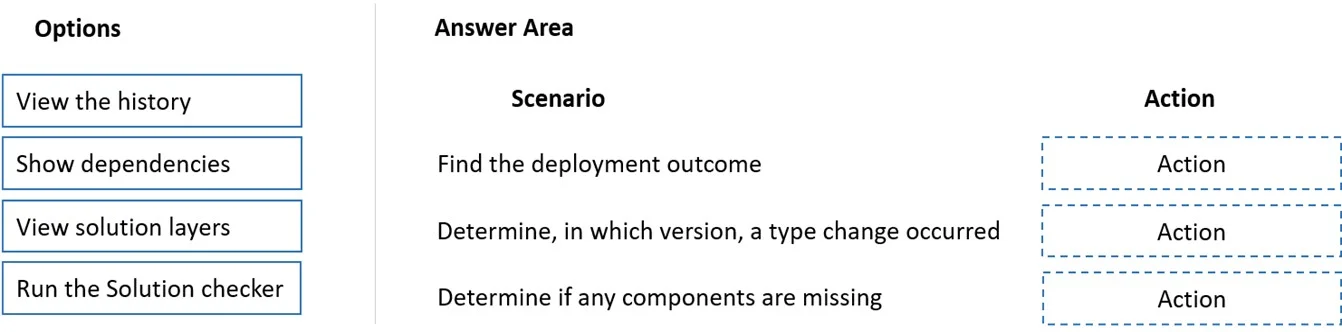
Drag and Drop Question You are deploying solutions from development environments into test environments. You need to gather solution information. What should you do? To answer, drag the appropriate…
The correct answer is View the history; View solution layers; Show dependencies. This drag-and-drop question assesses knowledge of Microsoft Power Platform solution management features by requiring test-takers to match specific troubleshooting scenarios with the correct solution actions.
Question
Exhibit
Answer Area
Drag items
Correct arrangement
- View the history
- View solution layers
- Show dependencies
Explanation
This drag-and-drop question assesses knowledge of Microsoft Power Platform solution management features by requiring test-takers to match specific troubleshooting scenarios with the correct solution actions.
Approach. The correct interaction involves dragging the appropriate action from the 'Options' list to the 'Action' slot next to each 'Scenario' in the 'Answer Area'.
-
Scenario: Find the deployment outcome
- Correct Action: View the history
- Reasoning: The deployment history provides a record of past deployments, including their status (success, failure), timestamps, and details. This is the primary place to check what happened during a deployment.
-
Scenario: Determine, in which version, a type change occurred
- Correct Action: View solution layers
- Reasoning: Solution layers allow you to see all the solutions that contain a specific component and the order in which they were applied. This helps in understanding how a component evolved across different versions and which specific solution introduced a particular change.
-
Scenario: Determine if any components are missing
- Correct Action: Show dependencies
- Reasoning: Solutions often rely on other components (dependencies). If a component is missing, it can prevent the solution from functioning correctly. Showing dependencies reveals what a component needs to operate and helps identify if any required parts are absent.
Common mistakes.
- common_mistake. A common mistake would be to misplace the actions or select 'Run the Solution checker' for one of these scenarios. 'Run the Solution checker' is used to analyze the solution for potential issues, performance problems, or adherence to best practices, but it doesn't directly provide information about deployment outcomes, version-specific component changes, or list missing dependencies in the way the other options do. For example, using 'Show dependencies' for 'Find the deployment outcome' is incorrect because dependencies relate to component relationships, not the overall deployment event log. Similarly, 'View history' would not effectively identify which specific solution layer introduced a type change, as that requires examining the layered structure of components.
Concept tested. This question tests the understanding of Microsoft Power Platform (or Dynamics 365) solution management, including the purpose and application of key features like deployment history, solution layering, and dependency viewing for troubleshooting and information gathering during the solution lifecycle.
Topics
Community Discussion
No community discussion yet for this question.