
PCNSE7 · Question #7
The IT department has received complaints abou VoIP call jitter when the sales staff is making or receiving calls. QoS is enabled on all firewall interfaces, but there is no QoS policy written in…
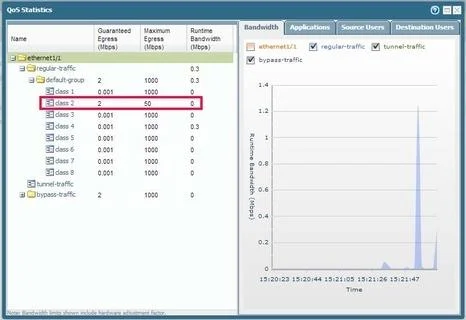
The correct answer is A. QoS Statistics. Select Network > QoS to view the QoS Policies page and click the Statistics link to view QoS bandwidth, active sessions of a selected QoS node or class, and active applications for the selected QoS node or class. For example, see the statistics for ethernet 1/1 with QoS enabled:
Question
The IT department has received complaints abou VoIP call jitter when the sales staff is making or receiving calls. QoS is enabled on all firewall interfaces, but there is no QoS policy written in the rulebase. The IT manager wants to find out what traffic is causing the jitter in real time when a user reports the jitter. Which feature can be used to identify, in real time, the applications taking up the most bandwidth?
Exhibit
Options
- AQoS Statistics
- BApplications Report
- CApplication Command Center (ACC)
- DQoS Log
How the community answered
(32 responses)- A78% (25)
- B3% (1)
- C13% (4)
- D6% (2)
Explanation
Select Network > QoS to view the QoS Policies page and click the Statistics link to view QoS bandwidth, active sessions of a selected QoS node or class, and active applications for the selected QoS node or class. For example, see the statistics for ethernet 1/1 with QoS enabled:
Topics
Community Discussion
No community discussion yet for this question.