
PCNSE7 · Question #11
After pushing a security policy from Panorama to a PA-3020 firewall, the firewall administrator notices that traffic logs from the PA-3020 are not appearing in Panorama's traffic logs. What could be…
The correct answer is D. None of the firewall's policies have been assigned a Log Forwarding profile. In order to see entries in the Panorama Monitor > Traffic or Monitor > Log screens, a profile must be created on the Palo Alto Networks device (or pushed from Panorama) to forward log traffic to 1. Go to Policies > Security and open the Options for a rule. 2. Under Log Setting…
Question
After pushing a security policy from Panorama to a PA-3020 firewall, the firewall administrator notices that traffic logs from the PA-3020 are not appearing in Panorama's traffic logs. What could be the problem?
Exhibit
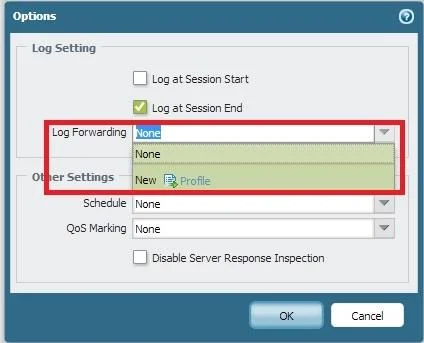
Options
- AA Server Profile has not been configured for logging to this Panorama device.
- BPanorama is not licensed to receive logs from this particular firewall.
- CThe firewall is not licensed for logging to this Panorama device.
- DNone of the firewall's policies have been assigned a Log Forwarding profile
How the community answered
(41 responses)- A15% (6)
- B5% (2)
- C7% (3)
- D73% (30)
Explanation
In order to see entries in the Panorama Monitor > Traffic or Monitor > Log screens, a profile must be created on the Palo Alto Networks device (or pushed from Panorama) to forward log traffic to 1. Go to Policies > Security and open the Options for a rule. 2. Under Log Setting, select New for Log Forwarding to create a new forwarding profile: https://live.paloaltonetworks.com/t5/Configuration-Articles/How-to-Create-a-Profile-to-Forward- Logs-to-Panorama/ta-p/54038
Topics
Community Discussion
No community discussion yet for this question.