
PCNSE7 · Question #57
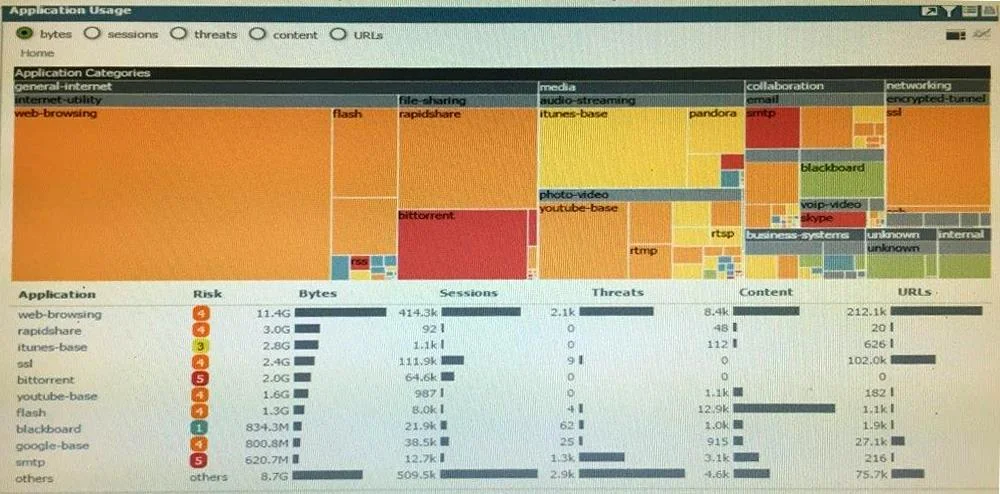
Click the Exhibit button. An administrator has noticed a large increase in bittorrent activity. The administrator wants to determine where the traffic is going on the company. What would be the…
The correct answer is D. Click on the bittorrent application link to view network activity. The application filter is a dynamic item that is created by selecting filter options (Category, Subcategory, Technology) in the application browser. Any new applications coming to PAN-OS in a content update that match the same filters, the set will automatically be added to the…
Question
Click the Exhibit button. An administrator has noticed a large increase in bittorrent activity. The administrator wants to determine where the traffic is going on the company. What would be the administrator's next step?
Exhibit
Options
- ARight-Click on the bittorrent link and select Value from the context menu
- BCreate a global filter for bittorrent traffic and then view Traffic logs.
- CCreate local filter for bittorrent traffic and then view Traffic logs.
- DClick on the bittorrent application link to view network activity
How the community answered
(58 responses)- A5% (3)
- B2% (1)
- C9% (5)
- D84% (49)
Explanation
The application filter is a dynamic item that is created by selecting filter options (Category, Subcategory, Technology) in the application browser. Any new applications coming to PAN-OS in a content update that match the same filters, the set will automatically be added to the Application Filter created. For example, when a 'peer-to-peer' is selected as a Technology Filter, that filter will automatically update if a new application gets added to that category in the latest content https://live.paloaltonetworks.com/t5/Learning-Articles/How-to-Block-Traffic-Based-on-Application- Filters-with-an/ta-p/59965
Topics
Community Discussion
No community discussion yet for this question.