
PCNSA · Question #86
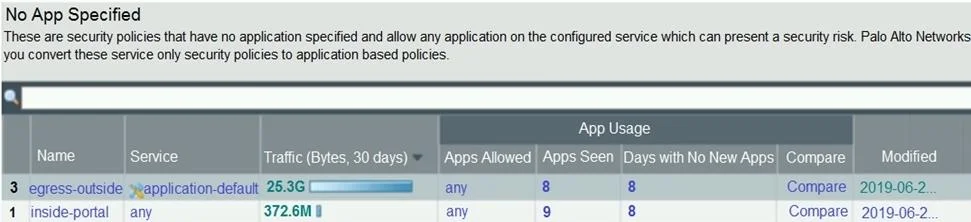
Based on the screenshot presented, which column contains the link that when clicked, opens a window to display all applications matched to the policy rule?
The correct answer is D. Apps Seen. In a Palo Alto Networks firewall policy rule view, the "Apps Seen" column provides a link to display all applications that have actually matched and been processed by that specific security policy rule.
Question
Based on the screenshot presented, which column contains the link that when clicked, opens a window to display all applications matched to the policy rule?
Exhibit
Options
- AApps Allowed
- BService
- CName
- DApps Seen
How the community answered
(18 responses)- B6% (1)
- C6% (1)
- D89% (16)
Why each option
In a Palo Alto Networks firewall policy rule view, the "Apps Seen" column provides a link to display all applications that have actually matched and been processed by that specific security policy rule.
"Apps Allowed" is not a standard column name that links to a detailed list of applications seen by a rule in the Palo Alto Networks web interface.
The "Service" column displays the configured service for the rule but does not provide a clickable link to see matched applications.
The "Name" column displays the name of the security policy rule itself and does not provide a link to view matched applications.
The "Apps Seen" column in the Palo Alto Networks web interface is specifically designed to show the applications that the firewall has identified and allowed or blocked based on a particular security policy rule's criteria, with a clickable link to a detailed view.
Concept tested: Palo Alto Networks Security Policy Monitoring and App-ID
Source: https://docs.paloaltonetworks.com/pan-os/10-2/pan-os-admin/policy/security-policy/monitor-security-policy-rule-usage
Topics
Community Discussion
No community discussion yet for this question.