
PCNSA · Question #145
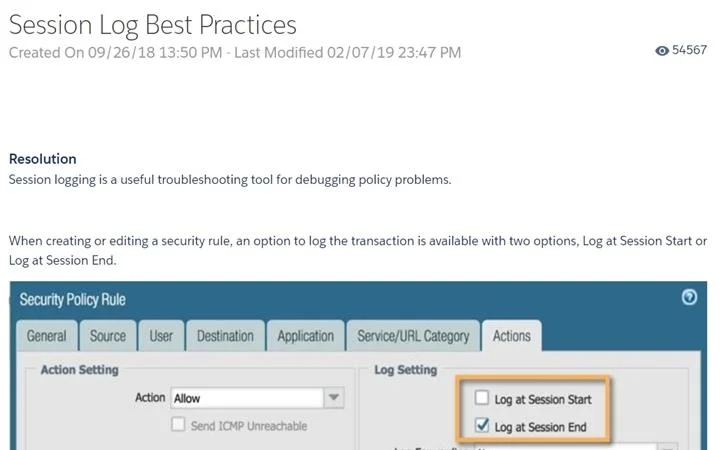
An administrator is reviewing another administrator's Security policy log settings. Which log setting configuration is consistent with best practices for normal traffic?
The correct answer is C. Log at Session Start disabled, Log at Session End enabled. Palo Alto Networks best practice is to enable 'Log at Session End' and disable 'Log at Session Start' for normal traffic. Session-end logs capture the complete session context: total bytes transferred, session duration, application identified, threat action taken, and the final…
Question
An administrator is reviewing another administrator's Security policy log settings. Which log setting configuration is consistent with best practices for normal traffic?
Exhibit
Options
- ALog at Session Start and Log at Session End both enabled
- BLog at Session Start enabled, Log at Session End disabled
- CLog at Session Start disabled, Log at Session End enabled
- DLog at Session Start and Log at Session End both disabled
How the community answered
(44 responses)- B5% (2)
- C93% (41)
- D2% (1)
Explanation
Palo Alto Networks best practice is to enable 'Log at Session End' and disable 'Log at Session Start' for normal traffic. Session-end logs capture the complete session context: total bytes transferred, session duration, application identified, threat action taken, and the final URL. This provides the most actionable and complete record per session. Logging at session start generates an entry before the full session context is known (bytes, final app classification may be incomplete) and creates double the log volume when paired with session-end logging, consuming storage and SIEM bandwidth unnecessarily. Logging at both start and end (A) doubles log volume with minimal added value. Logging only at start (B) misses final session details. Disabling both (D) leaves no audit trail and violates security monitoring best practices.
Topics
Community Discussion
No community discussion yet for this question.