
PCNSA · Question #68
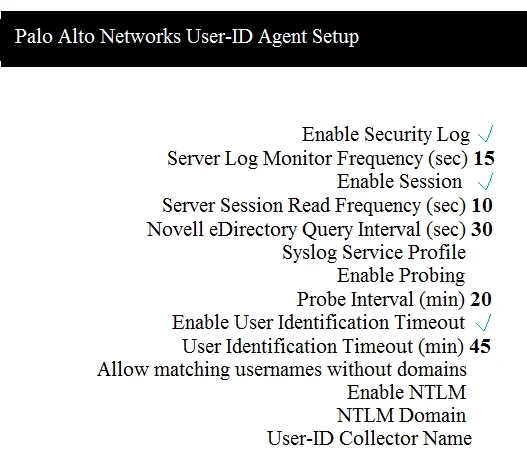
Which two configuration settings shown are not the default? (Choose two.)
The correct answer is B. Server Log Monitor Frequency (sec) C. Enable Session. This question refers to a User-ID agent or Windows-based log monitoring configuration screen. By default, 'Enable Security Log' (A) and 'Enable Probing' (D) are enabled, making them the defaults. 'Server Log Monitor Frequency' (B) has a default value of 2 seconds, so any other…
Question
Which two configuration settings shown are not the default? (Choose two.)
Exhibit
Options
- AEnable Security Log
- BServer Log Monitor Frequency (sec)
- CEnable Session
- DEnable Probing
How the community answered
(14 responses)- A7% (1)
- B93% (13)
Explanation
This question refers to a User-ID agent or Windows-based log monitoring configuration screen. By default, 'Enable Security Log' (A) and 'Enable Probing' (D) are enabled, making them the defaults. 'Server Log Monitor Frequency' (B) has a default value of 2 seconds, so any other displayed value would be non-default. 'Enable Session' (C) is not enabled by default in the User-ID agent configuration. Therefore, if the screenshot shows a different frequency and Session enabled, those two represent non-default settings.
Topics
Community Discussion
No community discussion yet for this question.