
PCNSA · Question #383
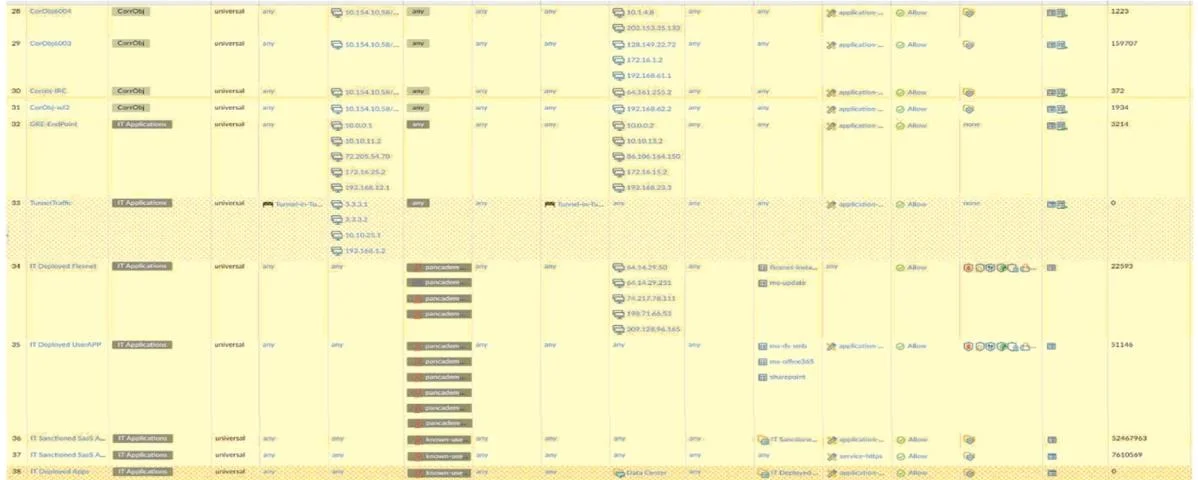
Review the screenshot below. Which statement is correct about the information it contains?
The correct answer is D. View Rulebase as Groups is checked. This question assesses an administrator's ability to interpret the visual display settings of a firewall's security policy rulebase. The correct statement identifies a specific organizational view for managing rules.
Question
Review the screenshot below. Which statement is correct about the information it contains?
Exhibit
Options
- AHighlight Unused Rules is checked.
- BTunnel Traffic has the High Risk tag applied.
- CThere are six Security policy rules on this firewall.
- DView Rulebase as Groups is checked.
How the community answered
(18 responses)- B6% (1)
- D94% (17)
Why each option
This question assesses an administrator's ability to interpret the visual display settings of a firewall's security policy rulebase. The correct statement identifies a specific organizational view for managing rules.
'Highlight Unused Rules' being checked would visually distinguish rules that have not been hit for a specified period, which is a different display setting related to rule optimization. This is not the primary organizational view mentioned.
'Tunnel Traffic' having a 'High Risk' tag applied would be a categorization of specific traffic or an application, not a general display setting for the rulebase itself.
The number of security policy rules would be indicated by a count, which is a quantitative measure, not a qualitative display option like grouping rules.
If 'View Rulebase as Groups' is checked, the firewall administrator sees policy rules organized into logical groups rather than a flat list, which aids in management and understanding of complex rule sets. This display option simplifies navigating and administering policies by collapsing or expanding related rules.
Concept tested: Firewall policy rulebase viewing and organization
Source: https://docs.paloaltonetworks.com/pan-os/10-2/pan-os-admin/policy/manage-policy-rulebase/organize-security-policy-rules
Topics
Community Discussion
No community discussion yet for this question.