
PCNSA · Question #301
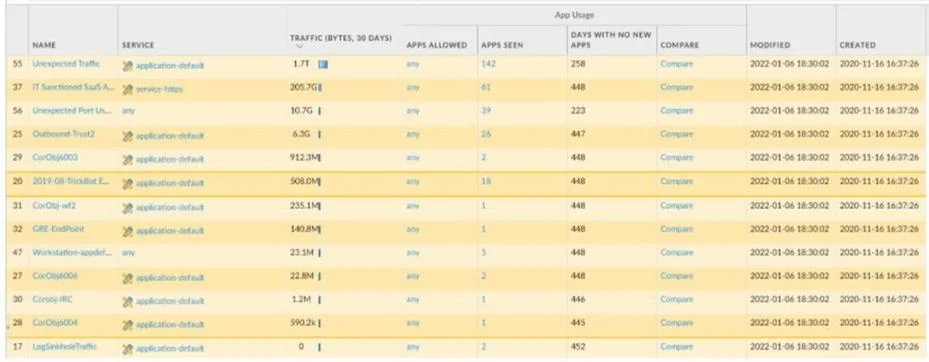
An administrator is updating Security policy to align with best practices. Which Policy Optimizer feature is shown in the screenshot below?
The correct answer is A. Rules without App Controls. Policy Optimizer's 'Rules without App Controls' feature identifies Security policy rules that still use port-based matching (e.g., application set to 'any') rather than App-ID. These rules are candidates for modernization to use specific App-IDs, which improves visibility and…
Question
An administrator is updating Security policy to align with best practices. Which Policy Optimizer feature is shown in the screenshot below?
Exhibit
Options
- ARules without App Controls
- BNew App Viewer
- CRule Usage - Unused
- DUnused Apps
How the community answered
(25 responses)- A88% (22)
- C8% (2)
- D4% (1)
Explanation
Policy Optimizer's 'Rules without App Controls' feature identifies Security policy rules that still use port-based matching (e.g., application set to 'any') rather than App-ID. These rules are candidates for modernization to use specific App-IDs, which improves visibility and reduces attack surface. 'Rule Usage - Unused' (C) shows rules that have seen no traffic. 'Unused Apps' (D) shows App-IDs in rules that matched no traffic. 'New App Viewer' (B) shows new applications learned from traffic logs. 'Rules without App Controls' specifically targets the best-practice gap of not using App-ID.
Topics
Community Discussion
No community discussion yet for this question.