
PCCSE · Question #36
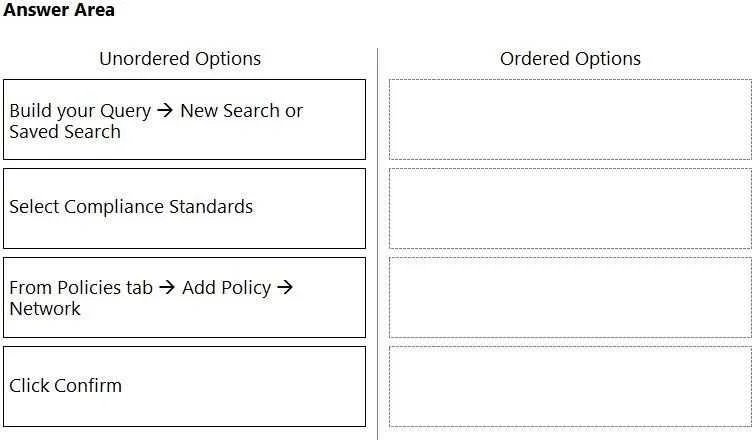
Drag and Drop Question What is the order of steps to create a custom network policy? (Drag the steps into the correct order of occurrence, from the first step to the last.) Answer:
The correct answer is From Policies tab -> Add Policy -> Network; Build your Query -> New Search or Saved Search; Select Compliance Standards; Click Confirm. The question tests the ability to correctly order the steps for creating a custom network policy within a management interface.
Question
Drag and Drop Question What is the order of steps to create a custom network policy? (Drag the steps into the correct order of occurrence, from the first step to the last.) Answer:
Exhibit
Answer Area
Drag items
Correct arrangement
- From Policies tab -> Add Policy -> Network
- Build your Query -> New Search or Saved Search
- Select Compliance Standards
- Click Confirm
Explanation
The question tests the ability to correctly order the steps for creating a custom network policy within a management interface.
Approach. The correct interaction is to drag the options from the 'Unordered Options' column to the 'Ordered Options' column in the following sequence:
- From Policies tab - Add Policy - Network: This is the most logical first step as it initiates the process of creating a new network policy, indicating navigation within a management console.
- Build your Query - New Search or Saved Search: After starting the policy creation, the next step is typically to define the scope or conditions for the policy. Building a query specifies which resources or activities the policy will evaluate.
- Select Compliance Standards: Once the query defines what the policy applies to, the next step is to specify the actual rules or standards that the policy will enforce or check against those resources or activities.
- Click Confirm: This is the final step to save and apply the configured custom network policy after all details have been defined.
The second exhibit image confirms this order as the correct solution.
Common mistakes.
- common_mistake. A common mistake would be to start with defining the query or selecting compliance standards before initiating the policy creation process. For instance, dragging 'Build your Query' or 'Select Compliance Standards' as the first step is incorrect because you must first navigate to the policy creation interface. Another mistake would be to incorrectly sequence 'Build your Query' and 'Select Compliance Standards'; you generally define the scope/conditions via a query before specifying the standards to apply to that scope. Placing 'Click Confirm' prematurely, before the policy's conditions and standards are fully defined, would also be incorrect.
Concept tested. The core concept tested is the procedural knowledge of creating a custom network policy within a specific platform or management system, likely an Azure portal or a similar security/compliance management console. It assesses understanding of the logical workflow for policy definition, including initiation, scope definition (querying), rule specification (compliance standards), and finalization.
Topics
Community Discussion
No community discussion yet for this question.