
PCCSE · Question #35
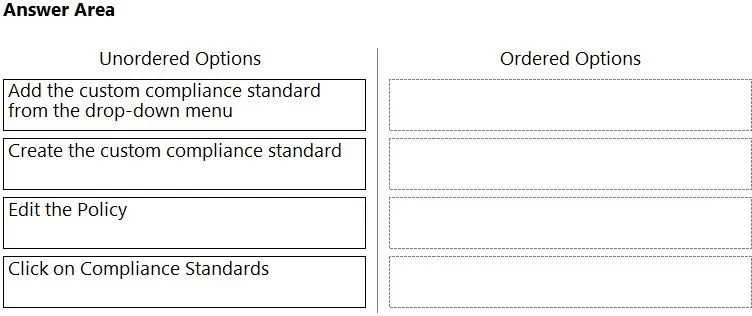
Drag and Drop Question Which order of steps map a policy to a custom compliance standard? (Drag the steps into the correct order of occurrence, from the first step to the last.) Answer:
The correct answer is Click on Compliance Standards; Create the custom compliance standard; Edit the Policy; Add the custom compliance standard from the drop-down menu. The question requires ordering steps to map a policy to a custom compliance standard, starting with navigation, then creation, and finally associating the created standard with a policy.
Question
Exhibit
Answer Area
Drag items
Correct arrangement
- Click on Compliance Standards
- Create the custom compliance standard
- Edit the Policy
- Add the custom compliance standard from the drop-down menu
Explanation
The question requires ordering steps to map a policy to a custom compliance standard, starting with navigation, then creation, and finally associating the created standard with a policy.
Approach. The correct interaction is to drag the steps into the following order, as depicted in the second exhibit image:
- Click on Compliance Standards: This is typically the initial navigation step in a management portal (e.g., Azure portal, Intune admin center) to access the section where compliance standards are managed. You must first go to the correct area.
- Create the custom compliance standard: Once you are in the compliance standards management section, the next logical step is to define and create the custom standard itself. This standard must exist before it can be applied or referenced.
- Edit the Policy: After the custom compliance standard has been created, you then need to navigate to the specific policy (e.g., a device compliance policy in Intune) that you wish to associate this standard with and initiate an edit action on that policy.
- Add the custom compliance standard from the drop-down menu: Within the policy's editing interface, there will be an option, often presented as a drop-down menu or selection field, to select and add the previously created custom compliance standard to that policy. This completes the mapping process.
Common mistakes.
- common_mistake. A common mistake would be attempting to edit a policy or add a standard before the standard has been created. For example, if 'Edit the Policy' or 'Add the custom compliance standard from the drop-down menu' were placed before 'Create the custom compliance standard', it would be incorrect because you cannot associate a standard that does not yet exist. Placing 'Create the custom compliance standard' first, before 'Click on Compliance Standards', is also illogical because 'Click on Compliance Standards' represents the navigation to the administrative area where creation tasks are performed. The steps must follow a logical workflow of navigation, creation, and then application.
Concept tested. The core concept being tested is the understanding of the administrative workflow and prerequisites for configuring and applying custom compliance standards within a policy management framework, such as Microsoft Intune's device compliance policies or Azure Policy. It assesses knowledge of the sequential steps required to define a new compliance rule and integrate it into an existing or new policy.
Topics
Community Discussion
No community discussion yet for this question.