
NSE7_PBC-7.2 · Question #85
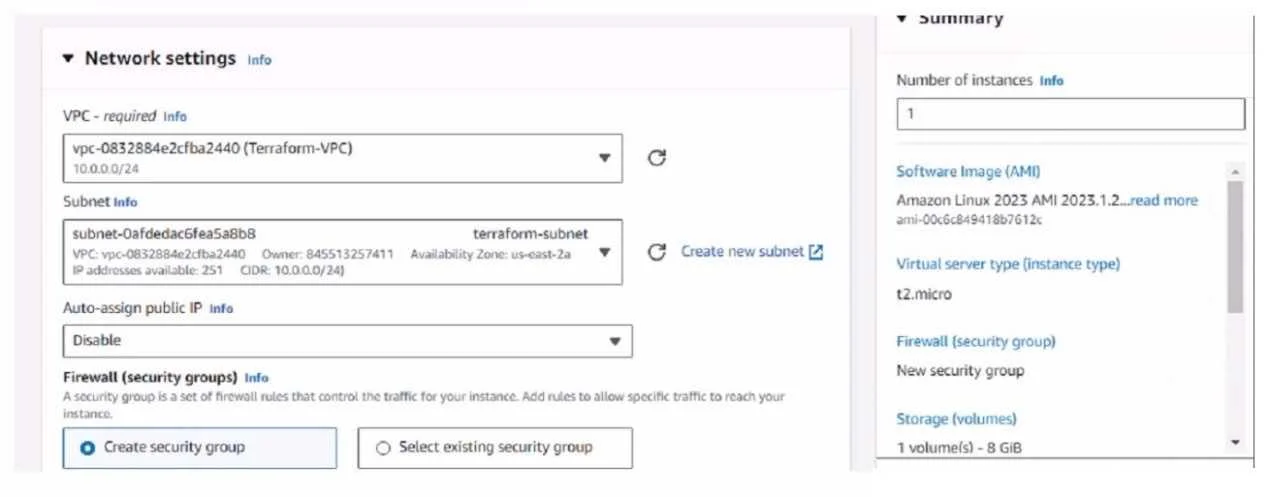
Refer to the exhibit. You have deployed a Linux EC2 instance in Amazon Web Services (AWS) with the settings shown on the exhibit What next step must the administrator take to access this instance…
The correct answer is D. Allocate an Elastic IP address and assign it to the instance. The next step the administrator must take to access the Linux EC2 instance from the internet is: Elastic IP (EIP) Requirement: By default, when an EC2 instance is launched in AWS, it receives a public IP address from Amazon's pool, which is not static. This IP address can…
Question
Refer to the exhibit. You have deployed a Linux EC2 instance in Amazon Web Services (AWS) with the settings shown on the exhibit What next step must the administrator take to access this instance from the internet?
Exhibit
Options
- AConfigure the user name and password.
- BEnable source and destination checks on the instance
- CEnable SSH and allocate it to the device
- DAllocate an Elastic IP address and assign it to the instance.
How the community answered
(23 responses)- A9% (2)
- B4% (1)
- C4% (1)
- D83% (19)
Explanation
The next step the administrator must take to access the Linux EC2 instance from the internet is: Elastic IP (EIP) Requirement: By default, when an EC2 instance is launched in AWS, it receives a public IP address from Amazon's pool, which is not static. This IP address can change, for example, if the instance is stopped and started again. To have a static IP address, you need to allocate an Elastic IP (EIP), which is a persistent public IP address, and then associate it with the Public Accessibility: Without an Elastic IP, the instance may not be accessible over the internet after a reboot or stop/start sequence. Assigning an Elastic IP ensures the instance can be accessed consistently using the same IP address.
Topics
Community Discussion
No community discussion yet for this question.