
NSE7_PBC-7.2 · Question #62
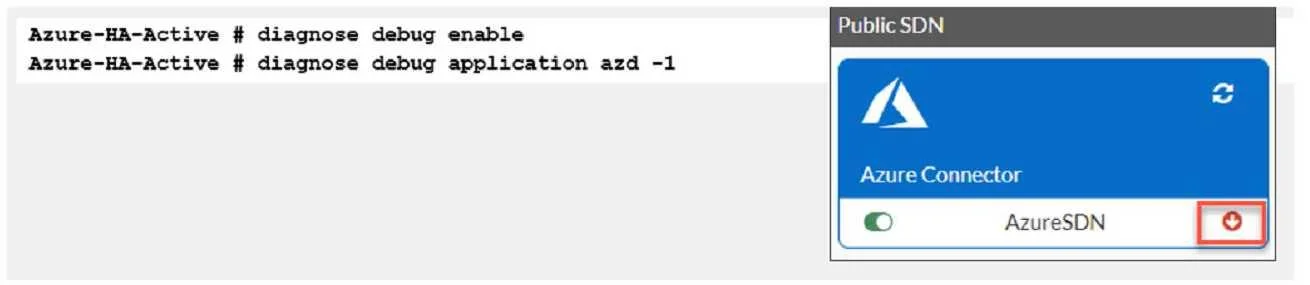
Refer to Exhibit. You are troubleshooting a Microsoft Azure SDN connector issue on your FortiGate VM in Azure. Which three settings should you check while troubleshooting this problem? (Choose three.)
The correct answer is C. Ensure FortiGate port4 can resolve DNS. D. Ensure FortiGate port1 has internet access E. Ensure IP address 169.254.169.254 is not blocked. The three settings that should be checked while troubleshooting this problem are: - Ensure FortiGate port4 can resolve DNS. This is because the Azure SDN connector requires DNS resolution to communicate with the Azure API. If the FortiGate port4 cannot resolve DNS, the SDN…
Question
Refer to Exhibit. You are troubleshooting a Microsoft Azure SDN connector issue on your FortiGate VM in Azure. Which three settings should you check while troubleshooting this problem? (Choose three.)
Exhibit
Options
- AUse the show vdom command to see hidden VDOMs.
- Buse the diag sys va command.
- CEnsure FortiGate port4 can resolve DNS.
- DEnsure FortiGate port1 has internet access
- EEnsure IP address 169.254.169.254 is not blocked
How the community answered
(43 responses)- A19% (8)
- B9% (4)
- C72% (31)
Explanation
The three settings that should be checked while troubleshooting this problem are: - Ensure FortiGate port4 can resolve DNS. This is because the Azure SDN connector requires DNS resolution to communicate with the Azure API. If the FortiGate port4 cannot resolve DNS, the SDN connector will not be able to retrieve the Azure resources and display them in the GUI. - Ensure FortiGate portl has internet access. This is because the Azure SDN connector requires internet access to communicate with the Azure API. If the FortiGate portl does not have internet access, the SDN connector will not be able to connect to the Azure cloud and display an error in - Ensure IP address 169.254.169.254 is not blocked. This is because the Azure SDN connector uses this IP address to obtain metadata information from the Azure instance. If this IP address is blocked by a firewall policy or a network ACL, the SDN connector will not be able to get the required information and display an error in the CLI.
Topics
Community Discussion
No community discussion yet for this question.