
NSE7_PBC-7.2 · Question #58
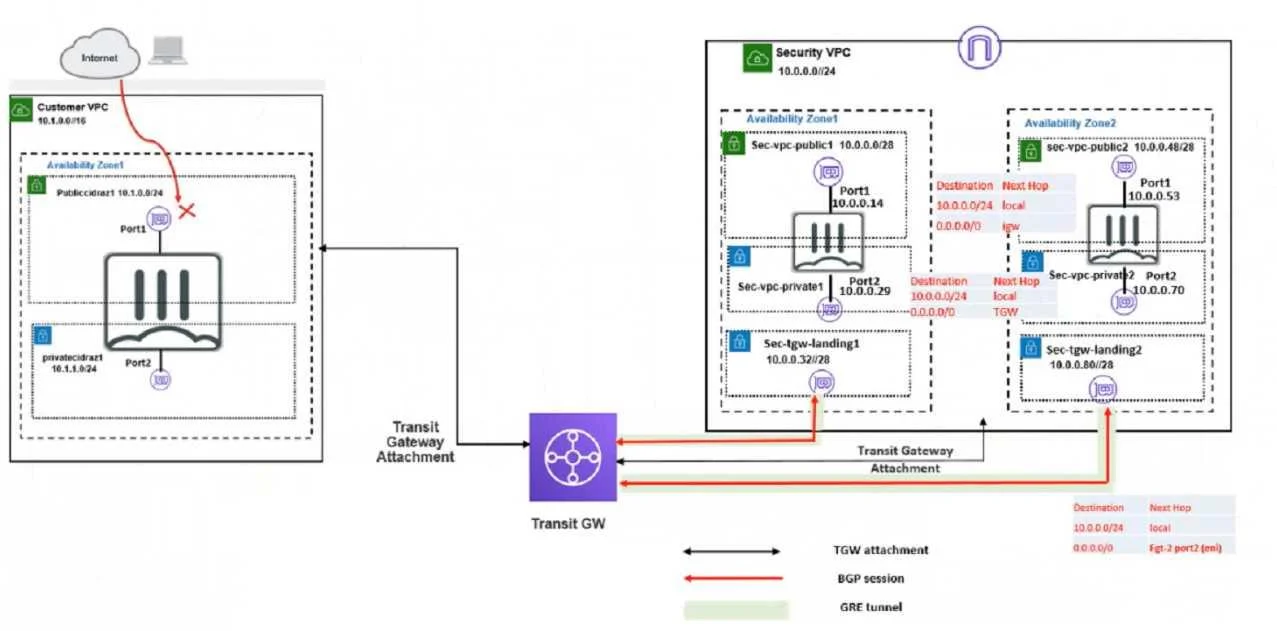
Refer to the exhibit. In your Amazon Web Services (AWS), you must allow inbound HTTPS access to the Customer VPC FortiGate VM from the internet. However, your HTTPS connection to the FortiGate VM in…
The correct answer is B. Add route destination 0 0.0 0/0 to target the transit gateway D. Deploy an internet gateway, associate an EIP in the private subnet, edit route tables, and add E. Deploy an internet gateway, associate an EIP in the public subnet, and attach the internet. Add route destination 0.0.0.0/0 to target the transit gateway. This will ensure that the Customer VPC FortiGate VM sends all the outbound internet traffic through the Security VPC, where it can be inspected by the Security VPC FortiGate VMs. The transit gateway is a network…
Question
Refer to the exhibit. In your Amazon Web Services (AWS), you must allow inbound HTTPS access to the Customer VPC FortiGate VM from the internet. However, your HTTPS connection to the FortiGate VM in the Customer VPC is not successful. Also, you must ensure that the Customer VPC FortiGate VM sends all the outbound Internet traffic through the Security VPC. How do you correct this Issue with minimal configuration changes? (Choose three.)
Exhibit
Options
- AAdd a route With your local internet public IP address as the destination and target transit
- BAdd route destination 0 0.0 0/0 to target the transit gateway
- CAdd a route With your local internet public IP address as the destination and target internet
- DDeploy an internet gateway, associate an EIP in the private subnet, edit route tables, and add
- EDeploy an internet gateway, associate an EIP in the public subnet, and attach the internet
How the community answered
(38 responses)- A8% (3)
- B79% (30)
- C13% (5)
Explanation
Add route destination 0.0.0.0/0 to target the transit gateway. This will ensure that the Customer VPC FortiGate VM sends all the outbound internet traffic through the Security VPC, where it can be inspected by the Security VPC FortiGate VMs. The transit gateway is a network device that connects multiple VPCs and on-premises networks in a hub-and-spoke model. Deploy an internet gateway, associate an EIP in the private subnet, edit route tables, and add a new route destination 0.0.0.0/0 to the target internet gateway. This will allow inbound HTTPS access to the Customer VPC FortiGate VM from the internet, by creating a public route for the private subnet where the FortiGate VM is located. An internet gateway is a service that enables communication between your VPC and the internet. An EIP is a public IPv4 address that you can allocate to your AWS account and associate with your resources. Deploy an internet gateway, associate an EIP in the public subnet, and attach the internet gateway to the Customer VPC. This will also allow inbound HTTPS access to the Customer VPC FortiGate VM from the internet, by creating a public route for the public subnet where the FortiGate VM is located. This is an alternative solution to option D, depending on which subnet you want to use for the FortiGate VM.
Topics
Community Discussion
No community discussion yet for this question.