
NSE7_PBC-7.2 · Question #43
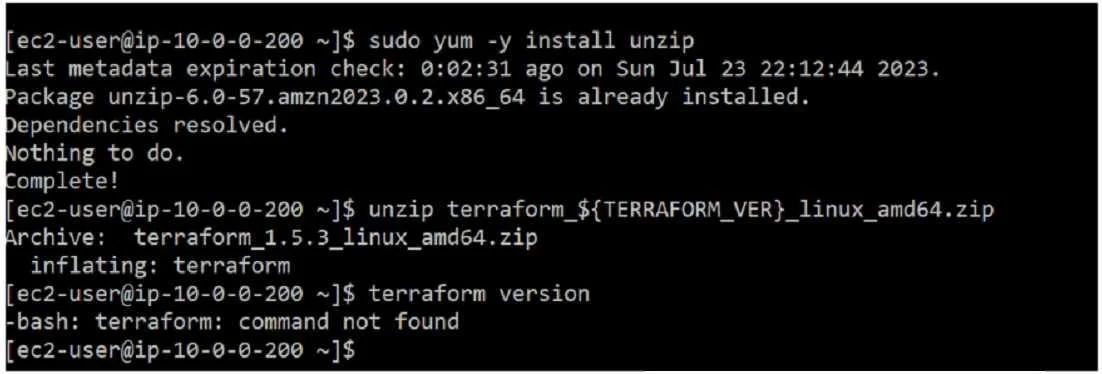
Refer to the exhibit. You are tasked with deploying FortiGate using Terraform. When you run the terraform version command during the Terraform installation, you get an error message. What could be…
The correct answer is A. You must move the binary file to the bin directory. According to the Terraform documentation for installing Terraform on Linux, you need to download a zip archive that contains a single binary file called terraform. You need to unzip the archive and move the binary file to a directory that is included in your system's PATH…
Question
Refer to the exhibit. You are tasked with deploying FortiGate using Terraform. When you run the terraform version command during the Terraform installation, you get an error message. What could be the reason that you are getting the command not found error?
Exhibit
Options
- AYou must move the binary file to the bin directory.
- BYou must change the directory location to the root directory
- CYou must assign correct permissions to the ec2-user.
- DYou must reinstall Terraform
How the community answered
(20 responses)- A75% (15)
- B15% (3)
- C5% (1)
- D5% (1)
Explanation
According to the Terraform documentation for installing Terraform on Linux, you need to download a zip archive that contains a single binary file called terraform. You need to unzip the archive and move the binary file to a directory that is included in your system's PATH environment variable, such as /usr/local/bin. This way, you can run the terraform command from any directory without specifying the full path. If you do not move the binary file to the bin directory, you will get a command not found error when you try to run the terraform version command, as shown in the screenshot. To fix this error, you need to move the binary file to the bin directory or specify the full path of the binary file when running the command.
Topics
Community Discussion
No community discussion yet for this question.