
NSE7_CDS_AR-7.6 · Question #8
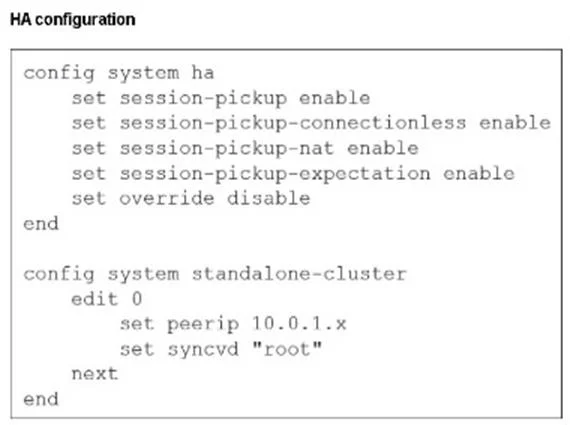
Refer to the exhibit. You deployed an HA active-active load balance sandwich with two FortiGate VMs in Microsoft Azure. After the deployment, you prefer to use FGSP to synchronize sessions and allow…
The correct answer is A. The opposite FortiGate port 2 IP address. In an FGSP (FortiGate Session Life Support Protocol) deployment with asymmetric traffic in Azure, the peerip must be set to the opposite FortiGate's internal interface (port2) IP address. This ensures session synchronization between FortiGates through the internal network…
Question
Refer to the exhibit. You deployed an HA active-active load balance sandwich with two FortiGate VMs in Microsoft Azure. After the deployment, you prefer to use FGSP to synchronize sessions and allow asymmetric return traffic. In the environment, FortiGate port 1 and port 2 are facing external and internal load balancers respectively. What IP address must you use in the peering configuration?
Exhibit
Options
- AThe opposite FortiGate port 2 IP address.
- BThe public load balancer port 2 IP address.
- CThe internal load balancer port 1 IP address.
- DThe opposite FortiGate port 1 IP address.
How the community answered
(32 responses)- A66% (21)
- B22% (7)
- C3% (1)
- D9% (3)
Explanation
In an FGSP (FortiGate Session Life Support Protocol) deployment with asymmetric traffic in Azure, the peerip must be set to the opposite FortiGate's internal interface (port2) IP address. This ensures session synchronization between FortiGates through the internal network (behind the internal load balancer), which is required for proper failover handling.
Topics
Community Discussion
No community discussion yet for this question.