
NSE7_CDS_AR-7.6 · Question #73
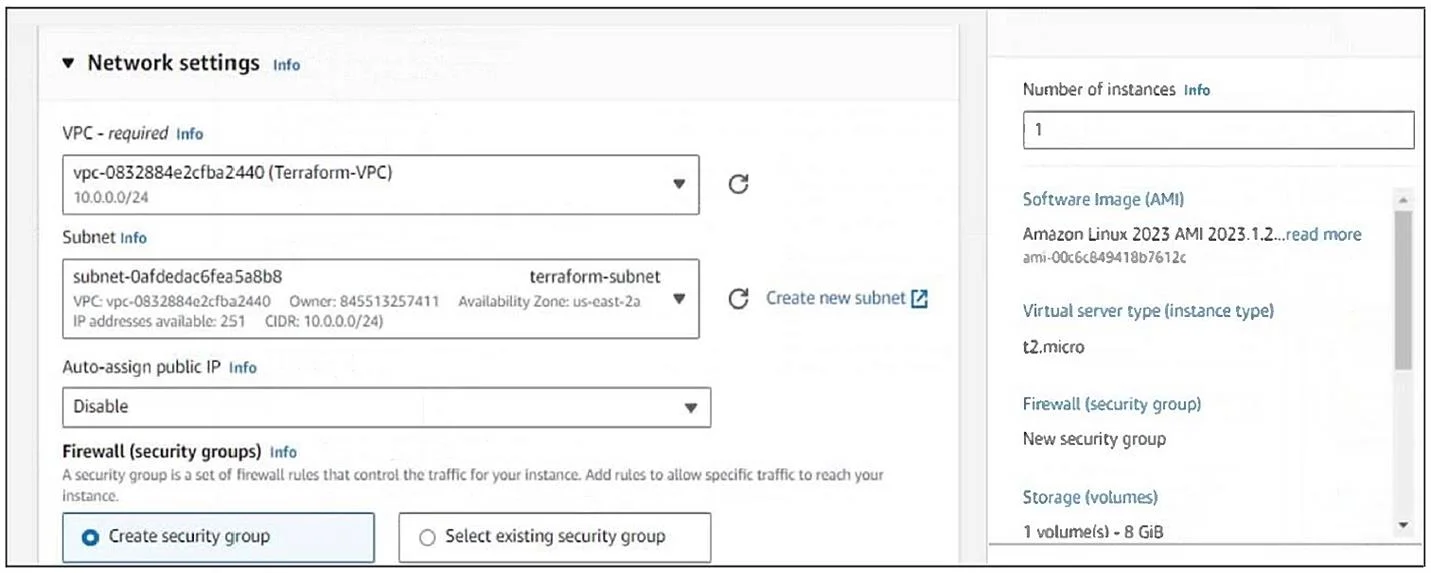
Refer to the exhibit. You have deployed a Linux EC2 instance in Amazon Web Services (AWS) with the settings shown on the exhibit. What step must the administrator take to access this instance from…
The correct answer is D. Allocate an Elastic IP address and assign it to the instance. In the exhibit, Auto-assign public IP is disabled, so the EC2 instance has no public IP address. To make it accessible from the internet (for example, via SSH), the administrator must allocate an Elastic IP (EIP) and assign it to the instance. This provides a reachable public…
Question
Refer to the exhibit. You have deployed a Linux EC2 instance in Amazon Web Services (AWS) with the settings shown on the exhibit. What step must the administrator take to access this instance from the internet?
Exhibit
Options
- ACreate a NAT gateway associated with the terraform-subnet.
- BConfigure the user name and password.
- CEnable SSH and allocate it to the device.
- DAllocate an Elastic IP address and assign it to the instance.
How the community answered
(58 responses)- A2% (1)
- B5% (3)
- C3% (2)
- D90% (52)
Explanation
In the exhibit, Auto-assign public IP is disabled, so the EC2 instance has no public IP address. To make it accessible from the internet (for example, via SSH), the administrator must allocate an Elastic IP (EIP) and assign it to the instance. This provides a reachable public IP while keeping the private IP intact.
Topics
Community Discussion
No community discussion yet for this question.