
NSE5_FMG-7.2 · Question #49
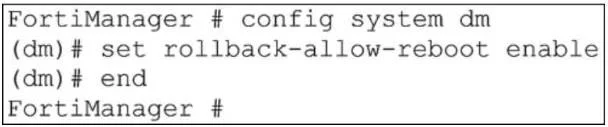
Refer to the exhibit. An administrator has configured the command shown in the exhibit on FortiManager. A configuration change has been installed from FortiManager to the managed FortiGate that…
The correct answer is C. It allows FortiGate to reboot and recover the previous configuration from its configuration file. If the connection fails to reestablish, FortiGate applies the unset command after 15 minutes (not configurable and not based on sock timeout values). If the connection remains down, and rollback-allow-reboot is enabled on FortiManager, FortiGate reboots to recover the previous…
Question
Refer to the exhibit. An administrator has configured the command shown in the exhibit on FortiManager. A configuration change has been installed from FortiManager to the managed FortiGate that causes the FGFM tunnel to go down for more than 15 minutes. What is the purpose of this command?
Exhibit
Options
- AIt allows FortiManager to unset the new configuration through CLI and reboot FortiGate.
- BIt allows FortiManager to revert and install a previous configuration revision on the managed
- CIt allows FortiGate to reboot and recover the previous configuration from its configuration file.
- DIt allows FortiGate to reboot and restore a previously working firmware image.
How the community answered
(51 responses)- A8% (4)
- B14% (7)
- C75% (38)
- D4% (2)
Explanation
If the connection fails to reestablish, FortiGate applies the unset command after 15 minutes (not configurable and not based on sock timeout values). If the connection remains down, and rollback-allow-reboot is enabled on FortiManager, FortiGate reboots to recover the previous configuration from its configuration file.
Topics
Community Discussion
No community discussion yet for this question.