
NSE5_FMG-7.2 · Question #27
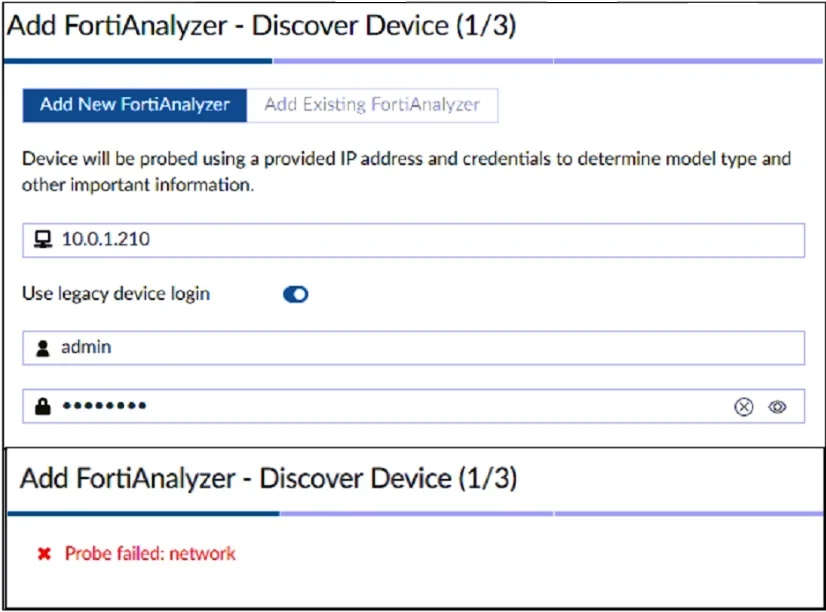
Refer to the exhibit. According to the error message, why is FortiManager failing to add the FortiAnalyzer device?
The correct answer is D. The administrator must select the FortiManager administrative access checkbox on the. Before you add FortiAnalyzer to FortiManager, you must enable the FortiManager Administrative Access checkbox on the FortiAnalyzer management interface. https://docs.fortinet.com/document/fortianalyzer/7.2.0/administration-guide/578841/configuring- network-interfaces
Question
Refer to the exhibit. According to the error message, why is FortiManager failing to add the FortiAnalyzer device?
Exhibit
Options
- AThe administrator must use the correct user name and password of the FortiAnalyzer device.
- BThe administrator must turn off the Use Legacy Device login and add the FortiAnalyzer device to
- CThe administrator must use the Add Model Device section and discover the FortiAnalyzer device.
- DThe administrator must select the FortiManager administrative access checkbox on the
How the community answered
(17 responses)- A6% (1)
- B6% (1)
- C18% (3)
- D71% (12)
Explanation
Before you add FortiAnalyzer to FortiManager, you must enable the FortiManager Administrative Access checkbox on the FortiAnalyzer management interface. https://docs.fortinet.com/document/fortianalyzer/7.2.0/administration-guide/578841/configuring- network-interfaces
Topics
Community Discussion
No community discussion yet for this question.