
NSE4_FGT-7.0 · Question #168
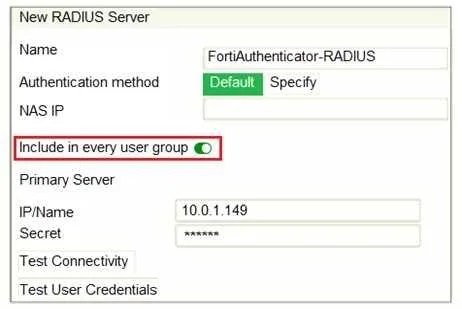
Refer to the exhibit, which contains a radius server configuration. An administrator added a configuration for a new RADIUS server. While configuring, the administrator selected the Include in every…
The correct answer is A. This option places the RADIUS server, and all users who can authenticate against that server. The 'Include in every user group' option on a RADIUS server configuration automatically adds the RADIUS server as an authentication option for all existing and future FortiGate user groups.
Question
Refer to the exhibit, which contains a radius server configuration. An administrator added a configuration for a new RADIUS server. While configuring, the administrator selected the Include in every user group option. What will be the impact of using Include in every user group option in a RADIUS configuration?
Exhibit
Options
- AThis option places the RADIUS server, and all users who can authenticate against that server,
- BThis option places all FortiGate users and groups required to authenticate into the RADIUS
- CThis option places all users into every RADIUS user group, including groups that are used for the
- DThis option places the RADIUS server, and all users who can authenticate against that server,
How the community answered
(41 responses)- A73% (30)
- B15% (6)
- C2% (1)
- D10% (4)
Why each option
The 'Include in every user group' option on a RADIUS server configuration automatically adds the RADIUS server as an authentication option for all existing and future FortiGate user groups.
Selecting 'Include in every user group' automatically adds the configured RADIUS server to every FortiGate user group, both currently existing and any new ones created in the future. This allows users authenticated by that specific RADIUS server to be part of any FortiGate user group, enabling them to inherit the access policies associated with those groups.
This option does not place FortiGate users into the RADIUS server; rather, it makes the RADIUS server available for FortiGate user groups to use for authentication.
This option doesn't place FortiGate users into RADIUS user groups; it places the RADIUS server itself as an authentication method into FortiGate user groups.
The latter part of the statement 'into the local database' is incorrect; it places the RADIUS server itself as an authentication option into FortiGate user groups, not users into the local database.
Concept tested: FortiGate RADIUS server group inclusion
Source: https://docs.fortinet.com/document/fortigate/7.4.0/administration-guide/708170/authenticating-users-with-external-radius-servers
Topics
Community Discussion
No community discussion yet for this question.