
NSE4_FGT-7.0 · Question #159
Refer to the exhibit to view the application control profile. Based on the configuration, what will happen to Apple FaceTime?
The correct answer is A. Apple FaceTime will be blocked, based on the Excessive-Bandwidth filter configuration. Apple FaceTime traffic will be blocked because the application control profile's 'Excessive-Bandwidth' filter is configured to block, and FaceTime is classified under this filter, which takes precedence over broader allow rules.
Question
Refer to the exhibit to view the application control profile. Based on the configuration, what will happen to Apple FaceTime?
Exhibit
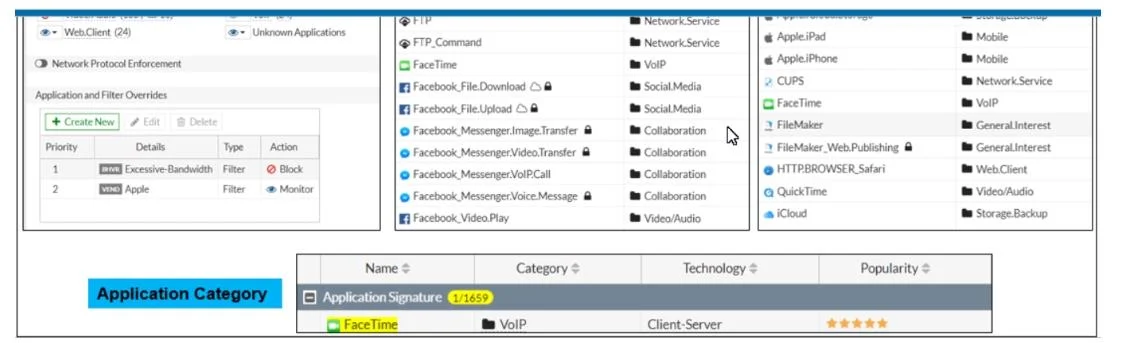
Options
- AApple FaceTime will be blocked, based on the Excessive-Bandwidth filter configuration
- BApple FaceTime will be allowed, based on the Apple filter configuration.
- CApple FaceTime will be allowed only if the filter in Application and Filter Overrides is set to Learn
- DApple FaceTime will be allowed, based on the Categories configuration.
How the community answered
(45 responses)- A73% (33)
- B9% (4)
- C16% (7)
- D2% (1)
Why each option
Apple FaceTime traffic will be blocked because the application control profile's 'Excessive-Bandwidth' filter is configured to block, and FaceTime is classified under this filter, which takes precedence over broader allow rules.
Apple FaceTime will be blocked because the application control profile includes an 'Excessive-Bandwidth' filter configured with a block action, and Apple FaceTime is classified in a way that triggers this specific filter, overriding less specific allow rules.
While an 'Apple' filter might generally allow Apple applications, more specific filters or those with 'block' actions, like 'Excessive-Bandwidth', often take precedence and can override broader allow rules if an application matches their criteria.
The 'Learn' action in an application control filter is used for discovery and monitoring of applications, not for enforcing an allow or block state, and would not explicitly permit FaceTime if a block rule is active.
Categories typically have the lowest precedence in application control profiles; if a more specific filter like 'Excessive-Bandwidth' blocks an application, that block will override any allow action set at the category level.
Concept tested: FortiGate application control profile precedence and filter actions
Source: https://docs.fortinet.com/document/fortigate/7.4.0/administration-guide/867566/application-control-profile
Topics
Community Discussion
No community discussion yet for this question.