
NSE4 · Question #478
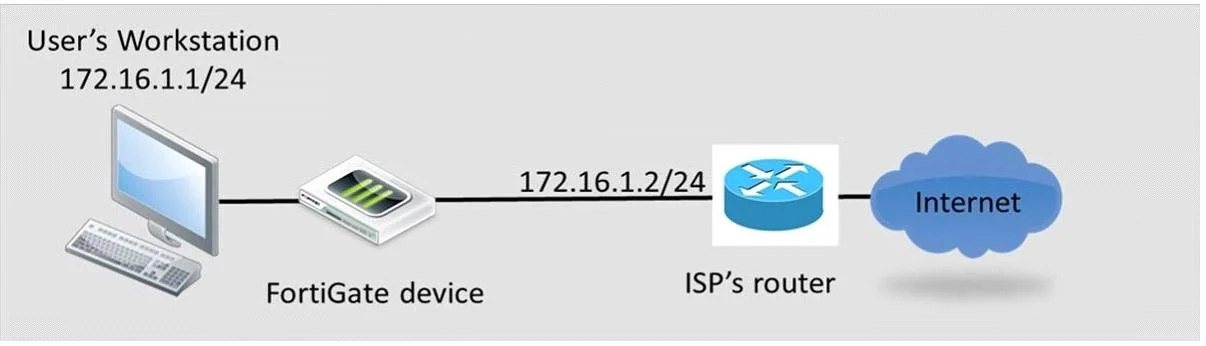
Review to the network topology in the exhibit. The workstation, 172.16.1.1/24, connects to port2 of the FortiGate device, and the ISP router, 172.16.1.2, connects to port1. Without changing IP…
The correct answer is A. At least one firewall policy from port2 to port1 to allow outgoing traffic. D. The FortiGate devices configured in transparent mode. To allow workstation traffic to the Internet without IP address changes, a firewall policy from port2 to port1 is required, and the FortiGate must be configured in transparent mode.
Question
Review to the network topology in the exhibit. The workstation, 172.16.1.1/24, connects to port2 of the FortiGate device, and the ISP router, 172.16.1.2, connects to port1. Without changing IP addressing, which configuration changes are required to properly forward users traffic to the Internet? (Choose two)
Exhibit
Options
- AAt least one firewall policy from port2 to port1 to allow outgoing traffic.
- BA default route configured in the FortiGuard devices pointing to the ISP's router.
- CStatic or dynamic IP addresses in both ForitGate interfaces port1 and port2.
- DThe FortiGate devices configured in transparent mode.
How the community answered
(32 responses)- A84% (27)
- B9% (3)
- C6% (2)
Why each option
To allow workstation traffic to the Internet without IP address changes, a firewall policy from port2 to port1 is required, and the FortiGate must be configured in transparent mode.
A firewall policy is essential in any FortiGate configuration to explicitly allow traffic from the internal network (port2) to the external network (port1/ISP) to pass through the device. Without a policy, all traffic is implicitly denied.
A default route is typically configured when the FortiGate acts as a router in NAT/Route mode, but transparent mode is more appropriate given the constraint of 'Without changing IP addressing' and the single subnet.
When the FortiGate is in transparent mode, its interfaces typically do not require static or dynamic IP addresses for traffic forwarding, as it operates at Layer 2.
The question states 'Without changing IP addressing' and shows both workstation and ISP router on the same subnet. For the FortiGate to forward traffic between devices on the same subnet without acting as a router, it must be in transparent mode, effectively bridging the two interfaces.
Concept tested: FortiGate transparent mode and firewall policies
Source: https://docs.fortinet.com/document/fortigate/7.4.0/admin-guide/339239/switching-between-nat-route-and-transparent-mode
Topics
Community Discussion
No community discussion yet for this question.