
NSE4 · Question #332
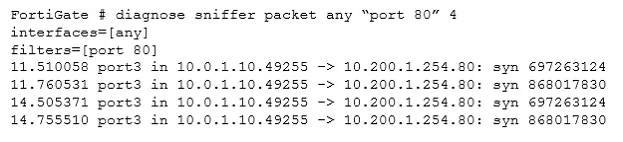
View the exhibit. The client cannot connect to the HTTP web server. The administrator run the FortiGate built-in sniffer and got the following output: What should be done next to troubleshoot the…
The correct answer is C. Capture the traffic using an external sniffer connected to port1. Since the FortiGate's internal sniffer shows no outgoing traffic on port1 destined for the web server, the next troubleshooting step is to capture traffic externally on port1 to verify if the FortiGate is physically sending packets.
Question
View the exhibit. The client cannot connect to the HTTP web server. The administrator run the FortiGate built-in sniffer and got the following output:
What should be done next to troubleshoot the problem?
Exhibits

Options
- AExecute another sniffer in the FortiGate, this time with the filter "host 10.0.1.10".
- BRun a sniffer in the web server.
- CCapture the traffic using an external sniffer connected to port1.
- DExecute a debug flow.
How the community answered
(21 responses)- A5% (1)
- B14% (3)
- C76% (16)
- D5% (1)
Why each option
Since the FortiGate's internal sniffer shows no outgoing traffic on port1 destined for the web server, the next troubleshooting step is to capture traffic externally on port1 to verify if the FortiGate is physically sending packets.
Executing another sniffer on the FortiGate with a different filter for the same source/destination is unlikely to reveal new information if the initial sniffer on port1 already showed no outgoing traffic.
Running a sniffer on the web server is premature because the FortiGate's sniffer indicates traffic isn't even leaving the FortiGate towards the server; thus, the server likely isn't receiving anything.
The provided FortiGate sniffer output shows no packets being forwarded out of port1 towards the destination web server, indicating either the FortiGate is not sending the traffic or the internal sniffer point is before the actual physical transmission. To definitively confirm if traffic physically leaves the FortiGate's port1 and to rule out any internal FortiGate issues or misinterpretations of the internal sniffer, capturing traffic directly on the wire connected to port1 with an external sniffer (like Wireshark) is crucial.
A debug flow on the FortiGate is an internal diagnostic tool. While useful, an external sniffer on port1 directly verifies physical transmission and helps rule out whether the FortiGate is internally misreporting or if the packet is dropped immediately after the internal sniffer point but before the physical interface.
Concept tested: FortiGate troubleshooting methodology using sniffers
Source: https://docs.fortinet.com/document/fortigate/7.4.0/handbook/316973/packet-capture
Topics
Community Discussion
No community discussion yet for this question.