
NSE4 · Question #294
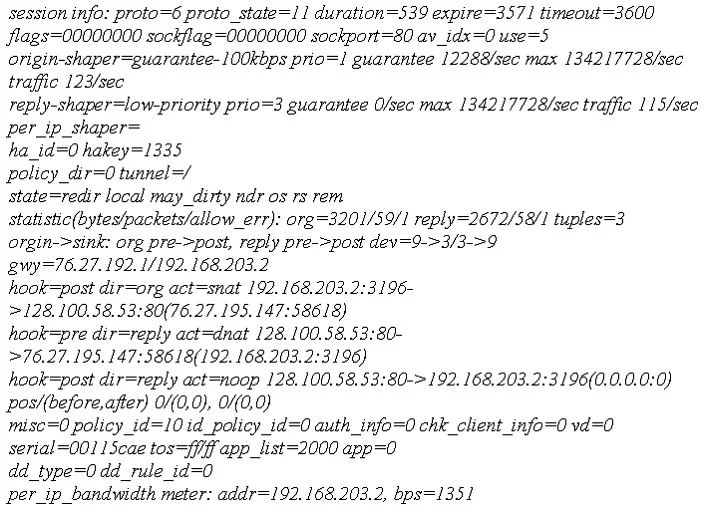
The diag sys session list command is executed in the CLI. The output of this command is shown in the exhibit. Based on the output from this command, which of the following statements is correct?
The correct answer is B. Traffic shaping is being applied to this session. Based on the session output, the presence of specific flags or fields indicates that traffic shaping is actively being applied to this particular session.
Question
The diag sys session list command is executed in the CLI. The output of this command is shown in the exhibit. Based on the output from this command, which of the following statements is correct?
Exhibit
Options
- AThis is a UDP session.
- BTraffic shaping is being applied to this session.
- CThis is an ICMP session.
- DThis traffic has been authenticated.
- EThis session matches a firewall policy with ID 5.
How the community answered
(45 responses)- A16% (7)
- B71% (32)
- C9% (4)
- D2% (1)
- E2% (1)
Why each option
Based on the session output, the presence of specific flags or fields indicates that traffic shaping is actively being applied to this particular session.
A UDP session is identified by `proto=17` in the session output, whereas `proto=6` indicates TCP and `proto=1` indicates ICMP.
The output of the `diag sys session list` command includes various flags and parameters for each session. If the exhibit contained flags such as `shaper_id`, `q_shaper`, or other explicit indicators related to bandwidth management, it would confirm that traffic shaping is being applied to the session.
An ICMP session is identified by `proto=1` in the session output, while `proto=6` indicates TCP and `proto=17` indicates UDP.
Authenticated traffic would typically show an associated user name or specific authentication flags within the session details, which are not implicitly indicated by the general premise.
A session matching a firewall policy with ID 5 would typically display `policyid=5` explicitly in the session output.
Concept tested: FortiGate session table interpretation (traffic shaping)
Source: https://docs.fortinet.com/document/fortigate/7.4.0/fortios-cli-reference/853040/diagnose-sys-session-list
Topics
Community Discussion
No community discussion yet for this question.