
NSE4 · Question #290
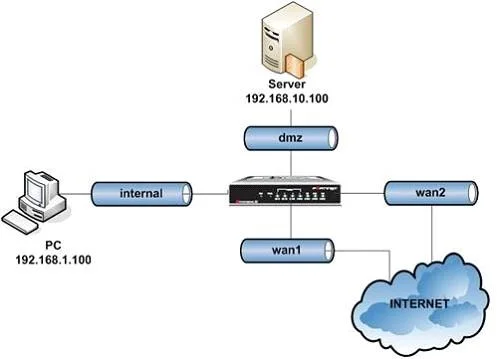
An intermittent connectivity issue is noticed between two devices located behind the FortiGate dmz and internal interfaces. A continuous sniffer trace is run on the FortiGate unit that the…
The correct answer is C. diagnose sniffer packet any "host 192.168.1.100 and host 192.168.10.100 " 3. To effectively troubleshoot an intermittent connectivity issue between two specific devices on a high-volume network for offline analysis, the best CLI command uses a precise host filter across all interfaces with a high verbosity level.
Question
An intermittent connectivity issue is noticed between two devices located behind the FortiGate dmz and internal interfaces. A continuous sniffer trace is run on the FortiGate unit that the administrator will convert into a .cap file for an off-line analysis with a sniffer application. Given the high volume of global traffic on the network, which of the following CLI commands will best allow the administrator to perform this troubleshooting operation?
Exhibit
Options
- Adiagnose sniffer packet any
- Bdiagnose sniffer packet dmz "" 3
- Cdiagnose sniffer packet any "host 192.168.1.100 and host 192.168.10.100 " 3
- Ddiagnose sniffer packet any "host 192.168.1.100 and host 192.168.10.100 " 4
How the community answered
(41 responses)- A12% (5)
- B5% (2)
- C80% (33)
- D2% (1)
Why each option
To effectively troubleshoot an intermittent connectivity issue between two specific devices on a high-volume network for offline analysis, the best CLI command uses a precise host filter across all interfaces with a high verbosity level.
Capturing `any` traffic without a filter is inappropriate for a high-volume network as it will produce an excessively large and difficult-to-analyze trace file that is mostly irrelevant.
Limiting the capture to only the `dmz` interface will miss traffic potentially traversing the `internal` interface or other interfaces involved in the communication path between the two devices and lacks a host-specific filter.
This command efficiently captures only the relevant traffic by filtering for communication specifically between the two identified hosts, `192.168.1.100` and `192.168.10.100`, across all interfaces (`any`). Verbosity level `3` ensures that both packet headers and data are captured, which is necessary for comprehensive offline analysis using a sniffer application.
While verbosity level `4` also captures packet data, level `3` is usually sufficient for off-line analysis by including headers and data, often preferred to level `4` for a smaller file size when interface information is not critical for host-to-host troubleshooting.
Concept tested: FortiGate CLI Sniffer Filters and Verbosity
Source: https://docs.fortinet.com/document/fortigate/7.4.0/fortios-cli-reference/169040/diagnose-sniffer-packet
Topics
Community Discussion
No community discussion yet for this question.