
NSE4 · Question #216
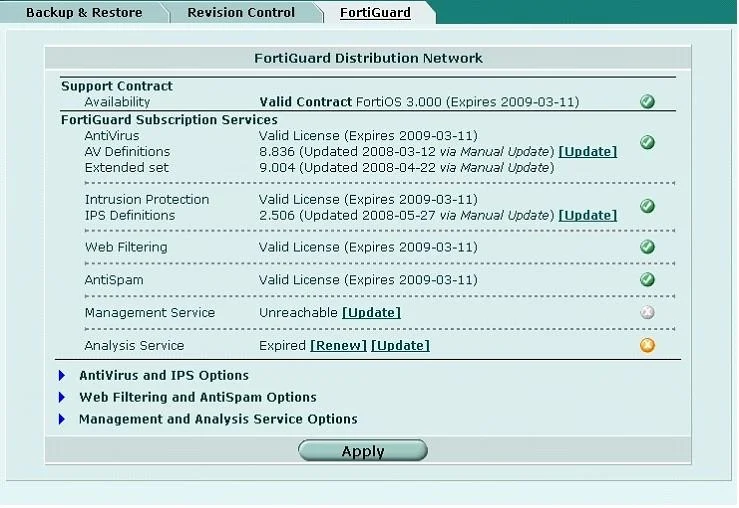
Which of the following statements best describes the green status indicators that appear next to different FortiGuard Distribution Network services as illustrated in the exhibit?
The correct answer is A. They indicate that the FortiGate unit is able to connect to the FortiGuard Distribution Network. Green status indicators next to FortiGuard services in the FortiGate GUI signify that the device has successfully established connectivity to the FortiGuard Distribution Network for those services.
Question
Which of the following statements best describes the green status indicators that appear next to different FortiGuard Distribution Network services as illustrated in the exhibit?
Exhibit
Options
- AThey indicate that the FortiGate unit is able to connect to the FortiGuard Distribution Network.
- BThey indicate that the FortiGate unit has the latest updates that are available from the FortiGuard
- CThey indicate that updates are available and should be downloaded from the FortiGuard
- DThey indicate that the FortiGate unit is in the process of downloading updates from the FortiGuard
How the community answered
(39 responses)- A87% (34)
- B3% (1)
- C3% (1)
- D8% (3)
Why each option
Green status indicators next to FortiGuard services in the FortiGate GUI signify that the device has successfully established connectivity to the FortiGuard Distribution Network for those services.
A green status indicator for FortiGuard services confirms that the FortiGate unit can successfully communicate with the FortiGuard Distribution Network servers for that specific service, indicating successful resolution and reachability for updates or lookups.
Having the latest updates is usually indicated by a 'Last update' timestamp being recent, not solely by the green connection status.
If updates were available but not yet downloaded, the indicator might be yellow or specific text would inform the user, not a simple green connection status.
An ongoing download process would typically show a different status, such as an animation or a specific message indicating 'Updating...' or 'Downloading,' not just a static green indicator.
Concept tested: FortiGuard service connection status indicators
Source: https://docs.fortinet.com/document/fortigate/7.4.0/administration-guide/523930/fortiguard-service
Topics
Community Discussion
No community discussion yet for this question.